Image generation models in 2025 have shifted from creative experimentation to reliable, product-ready systems
Multimodal grounding and reference-based editing now enable brand-safe, multilingual, and factually accurate image generation
Choosing the right model depends on workflow needs such as editing precision, character consistency, localization, and deployment control
Introduction & context
I've spent the last year shipping AI-generated ads at scale. Here's what actually works.
I'm a Software Engineer atKeyValue — we provide engineering support for product companies. For the past year, I've been working withPencil, an AI-powered ad generation platform that helps brands create static social ads at scale. My focus has been on the image generation pipeline and agentic AI systems — the intelligence layer that lets users interact with image and video tools through natural conversation.
Our users upload brand assets, describe what they want, and expect production-ready creatives back. Not "impressive for AI" — actually ready to run as paid media.
This post recaps the major image generation models I used this year, with honest opinions forged in production, not playground demos.
Where we started
A year ago, our workflow was duct tape and prayer. We ran ComfyUI pipelines stitching together Imagen, Bria, and self-hosted Stable Diffusion. Every job required careful prompt engineering — if we wanted brand-appropriate output, we had to manually encode brand guidelines into the prompt. Relighting was hit-or-miss. Complex edits meant complex workflows. And users kept filing the same tickets:
"The product lighting looks off."
"The text is garbled."
"It changed the background but also changed my product."
"This looks AI-generated."
The shift to multimodal models changed everything. We can now provide context directly — reference images, brand guidelines, previous iterations — and the model understands intent rather than just pattern-matching keywords. Quality and precision editing have both improved dramatically. Images that pass the "doesn't look AI-generated" test are now the norm rather than the exception.
How we tested
Working with ad creatives over the past year, the same requests kept surfacing. Users didn't ask for "better diffusion models" — they asked for specific things:
"Can it get the text right? Every time?"
"If I change one thing, will it break everything else?"
"Can I use the same character across a campaign?"
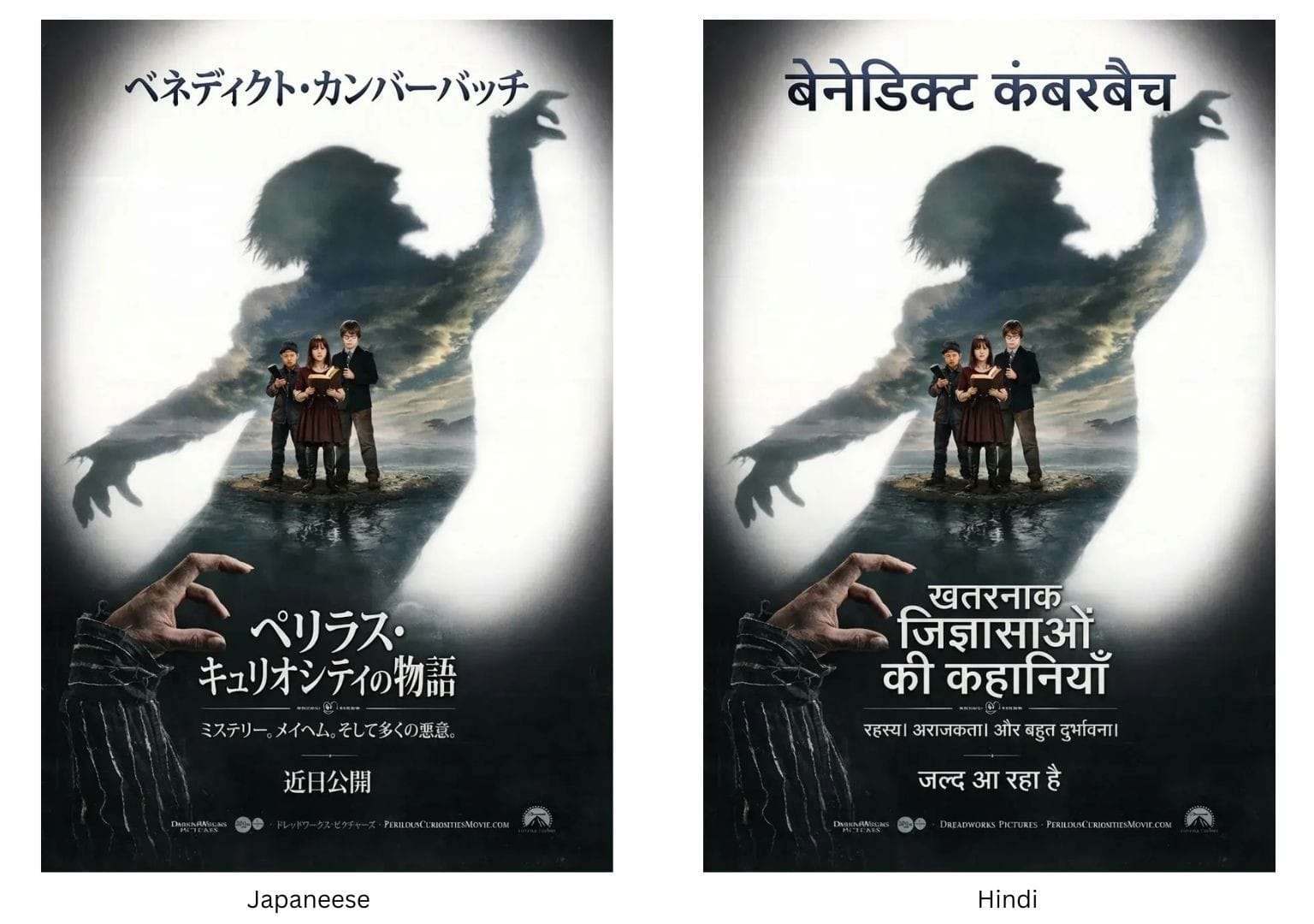
"Will this work in Japanese? Hindi?"
"Can it generate accurate data, not made-up stats?"
"Does it actually look real?"
So that's what we tested. Six scenarios, each tied to a real workflow need:
Test
What It Measures
Why it Matters
Text Rendering
Accuracy of headlines, taglines
Menus, product labels, CTAs — text errors kill ads with a lot of postprocess
Surgical Edit
Change one thing without breaking the rest
Iterative refinement is the core of ad creative work
Character Consistency
Same person across multiple scenes
Campaign continuity, brand mascots, storytelling
Localization
Translate text while preserving layout
Global campaigns need localized assets fast
Real-Time Grounding
Factually accurate data in infographics
Can't ship hallucinated statistics
Photorealism
Does it look like a photograph or a render?
"Looks AI-generated" is a death sentence for ads
Below is a hands-on comparison of leading image generation models for product teams, evaluated for editing precision, text rendering, character consistency, and real-world deployment fit.
Imagen 4 (Google DeepMind)
Why it's in our stack
Imagen 4 is our volume play. When users need to explore ten directions before committing to one — testing concepts, iterating on layouts, generating options for client review — waiting 30 seconds per image kills momentum. Imagen 4 Fast delivers up to 10x faster generation, which means we can show options quickly and refine the winners with more precise tools.
What users say
The speed gets appreciation, but the limits surface fast.
"Love how quick it is. I can try a dozen ideas in the time other models give me one."
"Quality is hit-or-miss though. I burn through dozens of outputs to find one worth keeping."
"Great for getting ideas, but I always need to take it somewhere else for edits."
Strengths
Speed — Fast mode delivers up to 10x faster generation, enabling rapid creative exploration
Typography — Google's investment shows; headlines and CTAs come out clean more often than not
Resolution — 2K output sufficient for most digital ad placements
Limitations
No editing — Generation-first model; no inpainting, no surgical edits, no "change just this one thing"
Consistency — Each generation is independent; can't maintain character or product identity across outputs
No grounding — Lacks real-world knowledge; will hallucinate facts in infographics
Complex compositions — Struggles with small faces, thin structures, intricate arrangements
From our tests
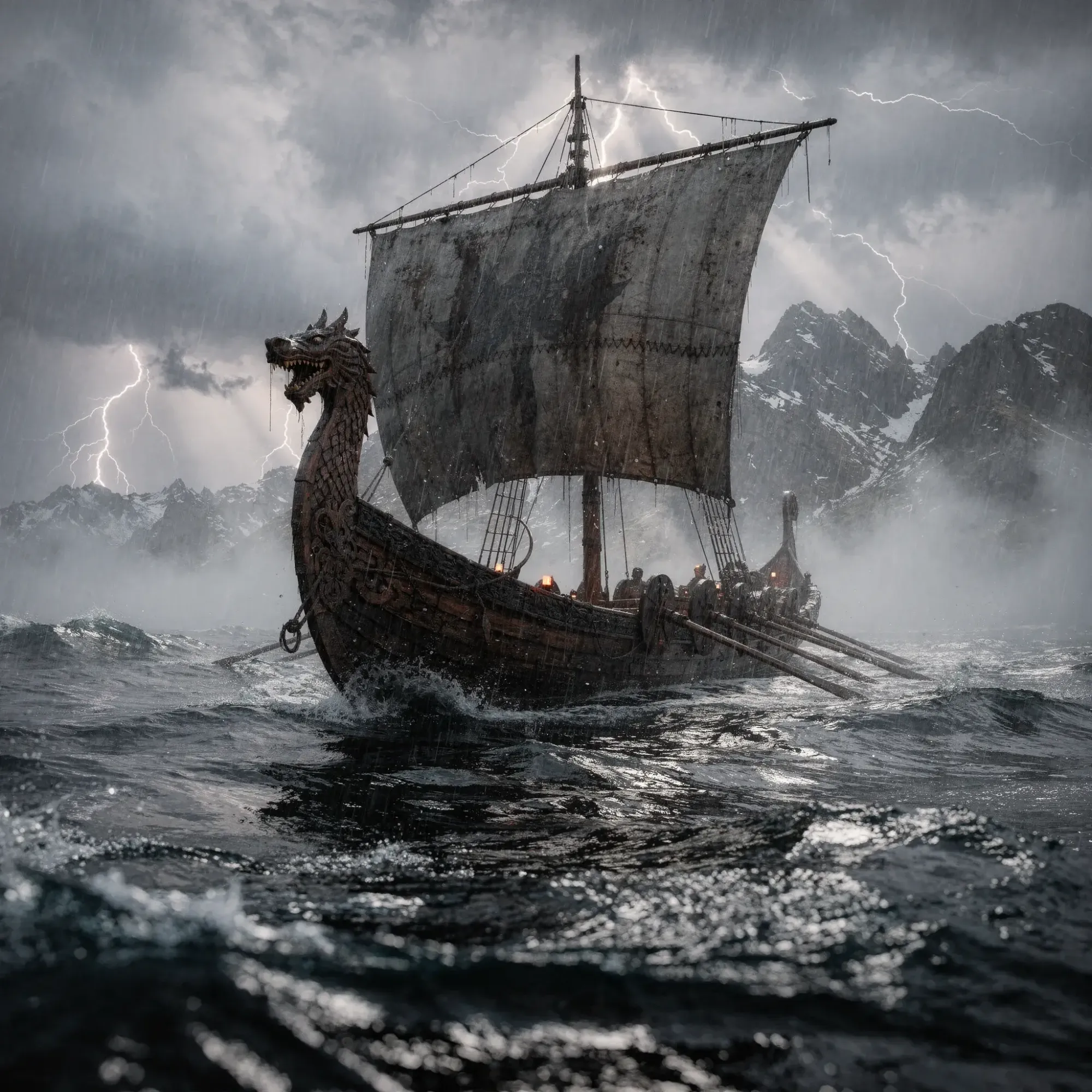
Photorealism
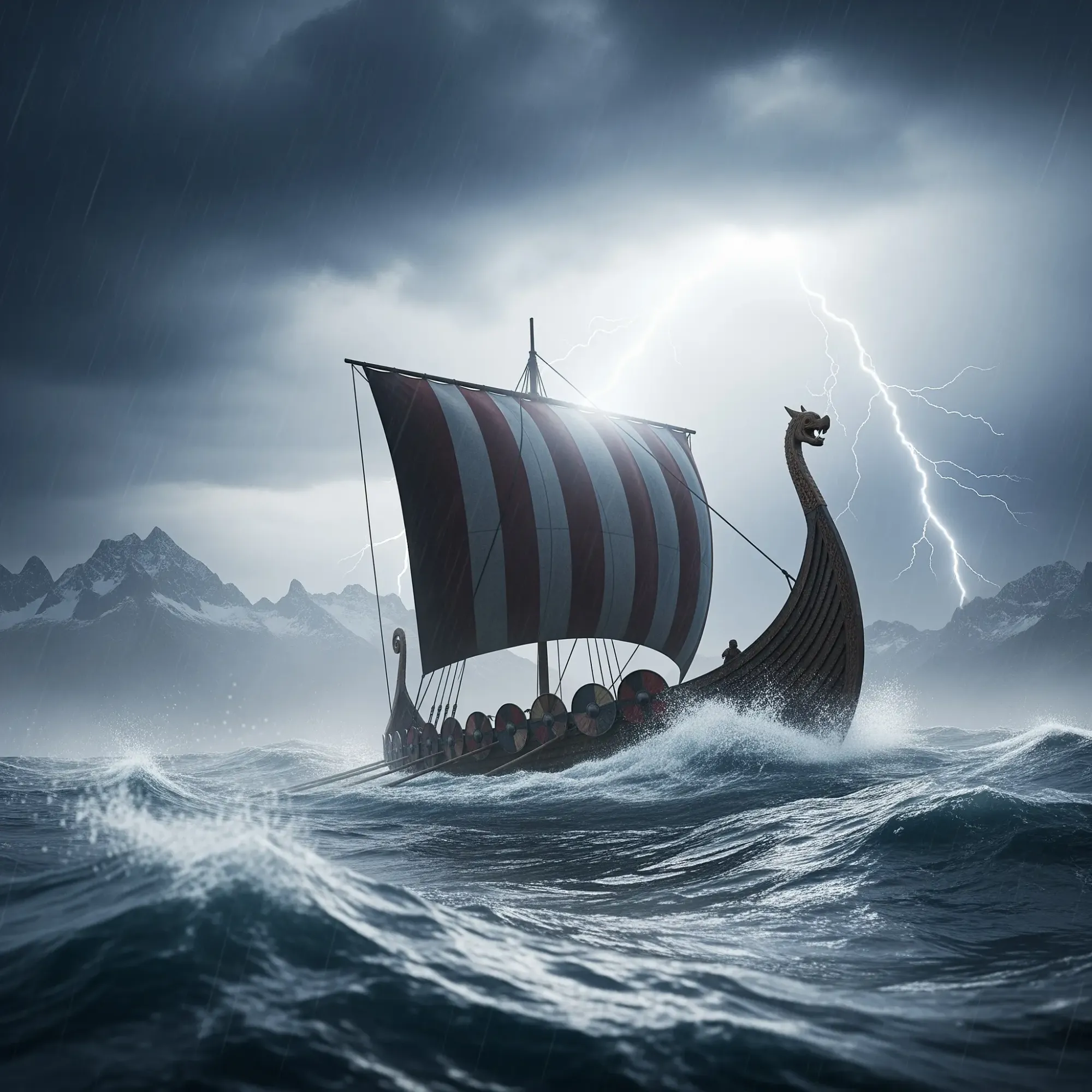
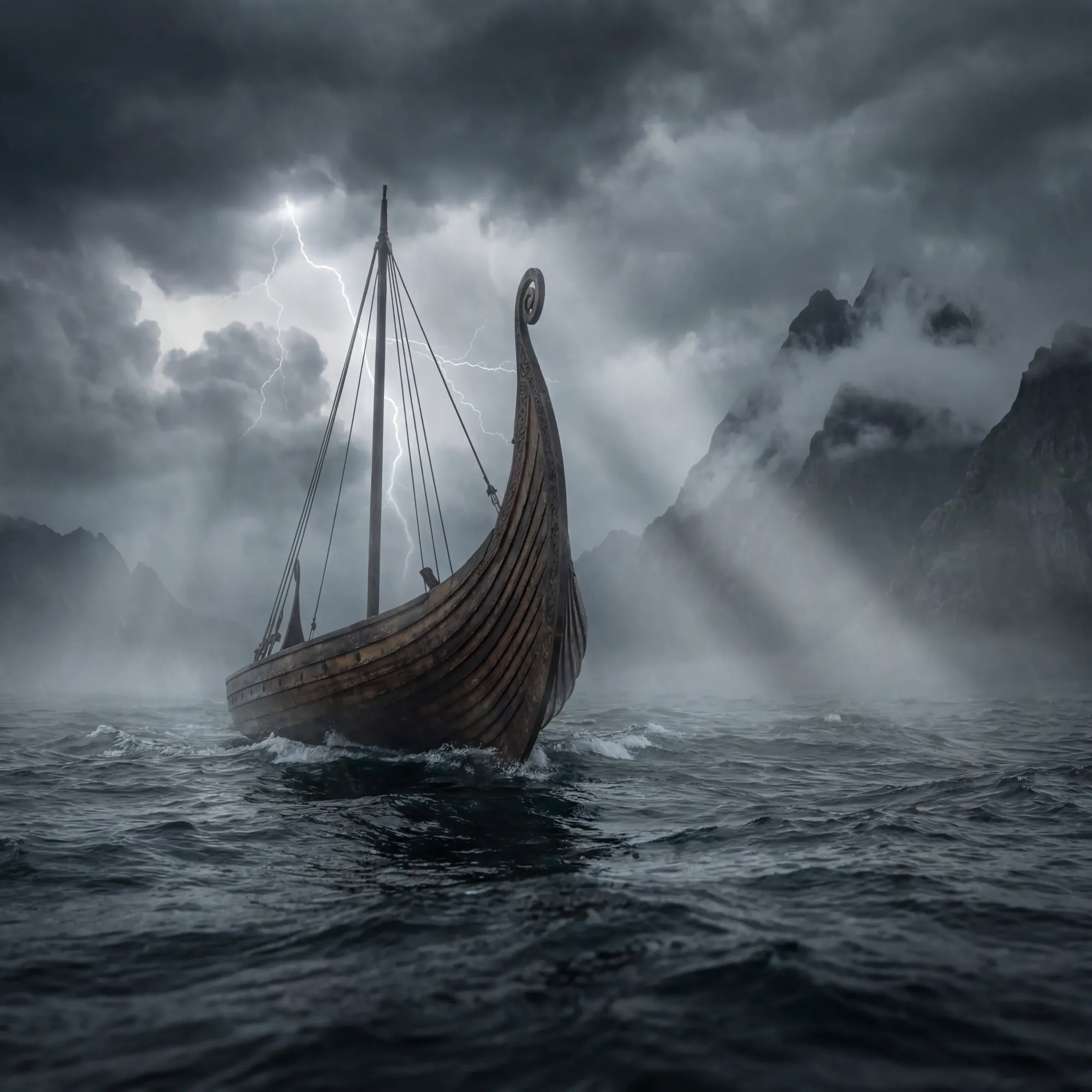
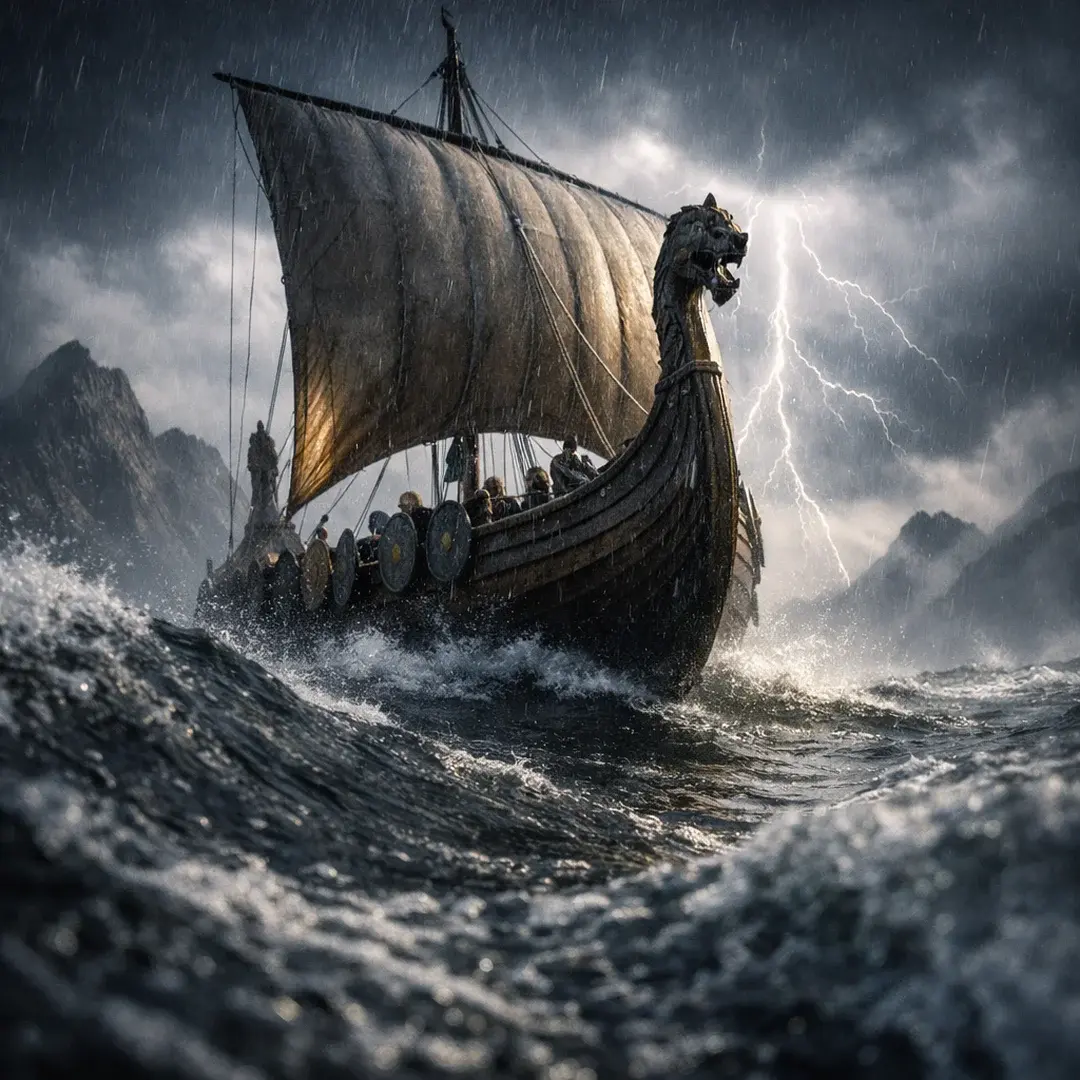
Prompt: A Viking longship cutting through rough, dark ocean waves, shot from a low, slightly off-center angle near the waterline. Jagged mountains loom in the distance under a stormy sky. Forked lightning illuminates the clouds behind the ship, creating dramatic rim light along the sails and hull. Cold rain and sea mist hang in the air, with volumetric lighting visible through the fog. The scene is photorealistic and high-resolution, captured in the style of a Hasselblad X2D 100C, shallow depth of field with crisp foreground detail and softly fading background. HDR processing enhances contrast and texture while preserving a moody, atmospheric look.
Result: Imagen 4 produced quality output with clean rendering, though the aesthetic leaned more to "digital illustration" than true photograph. Good for concept art and rapid ideation.
Text rendering
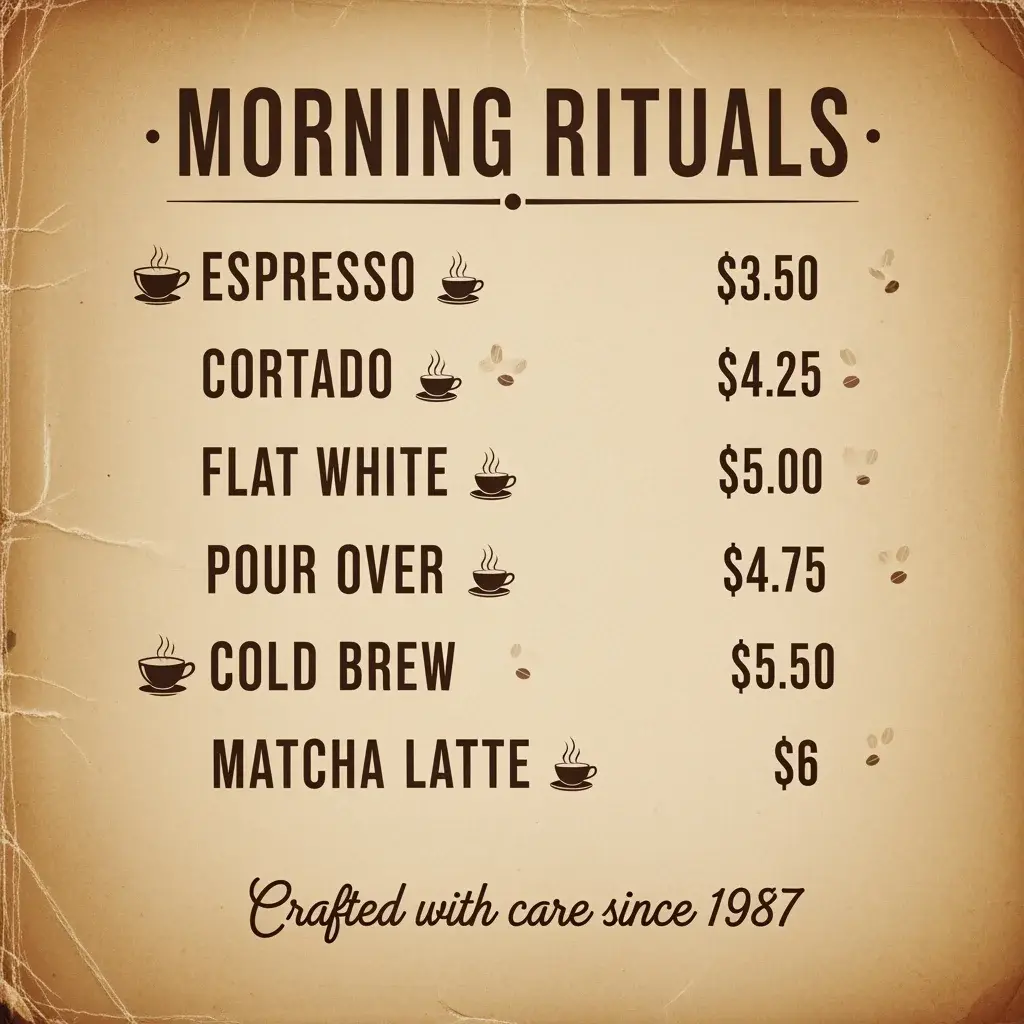
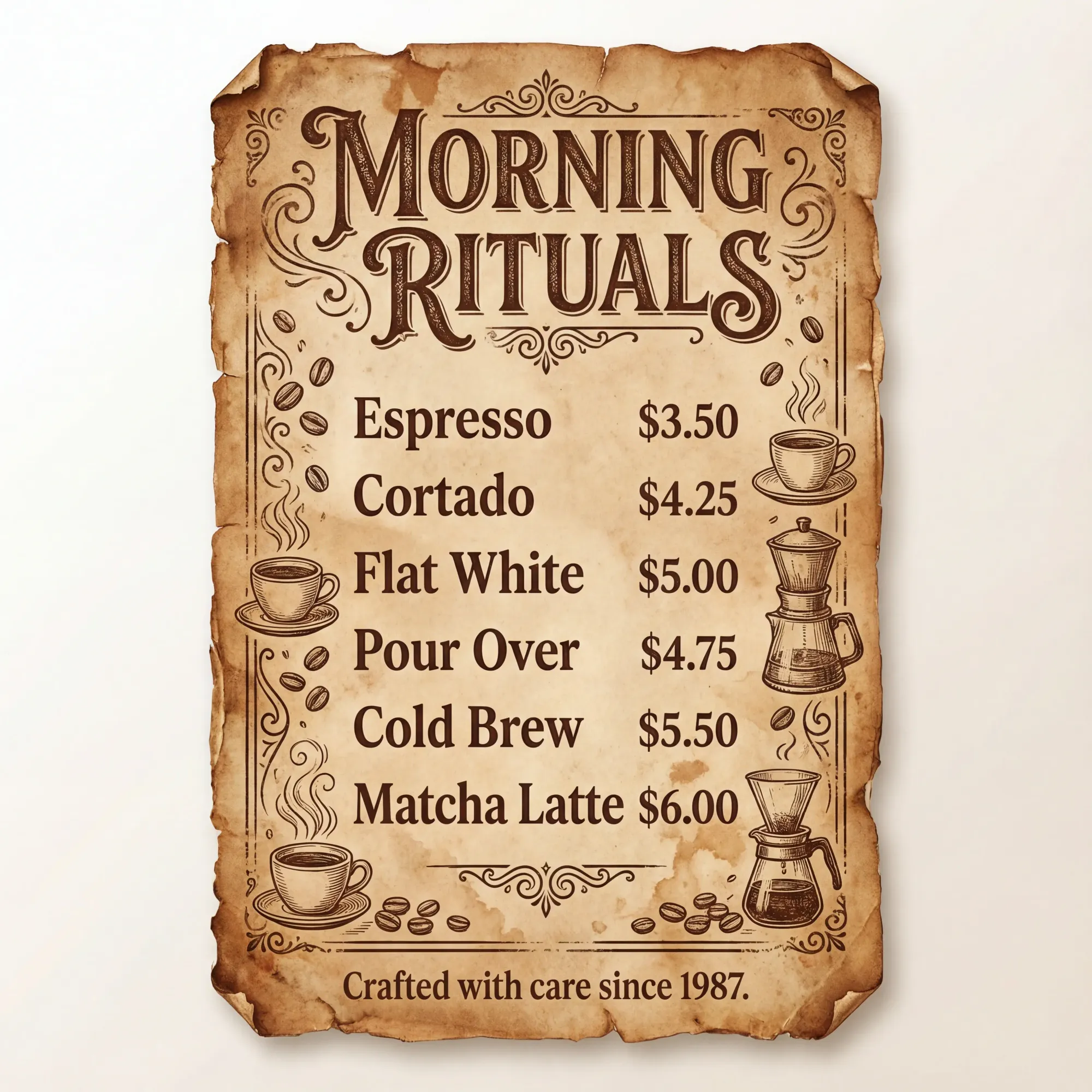
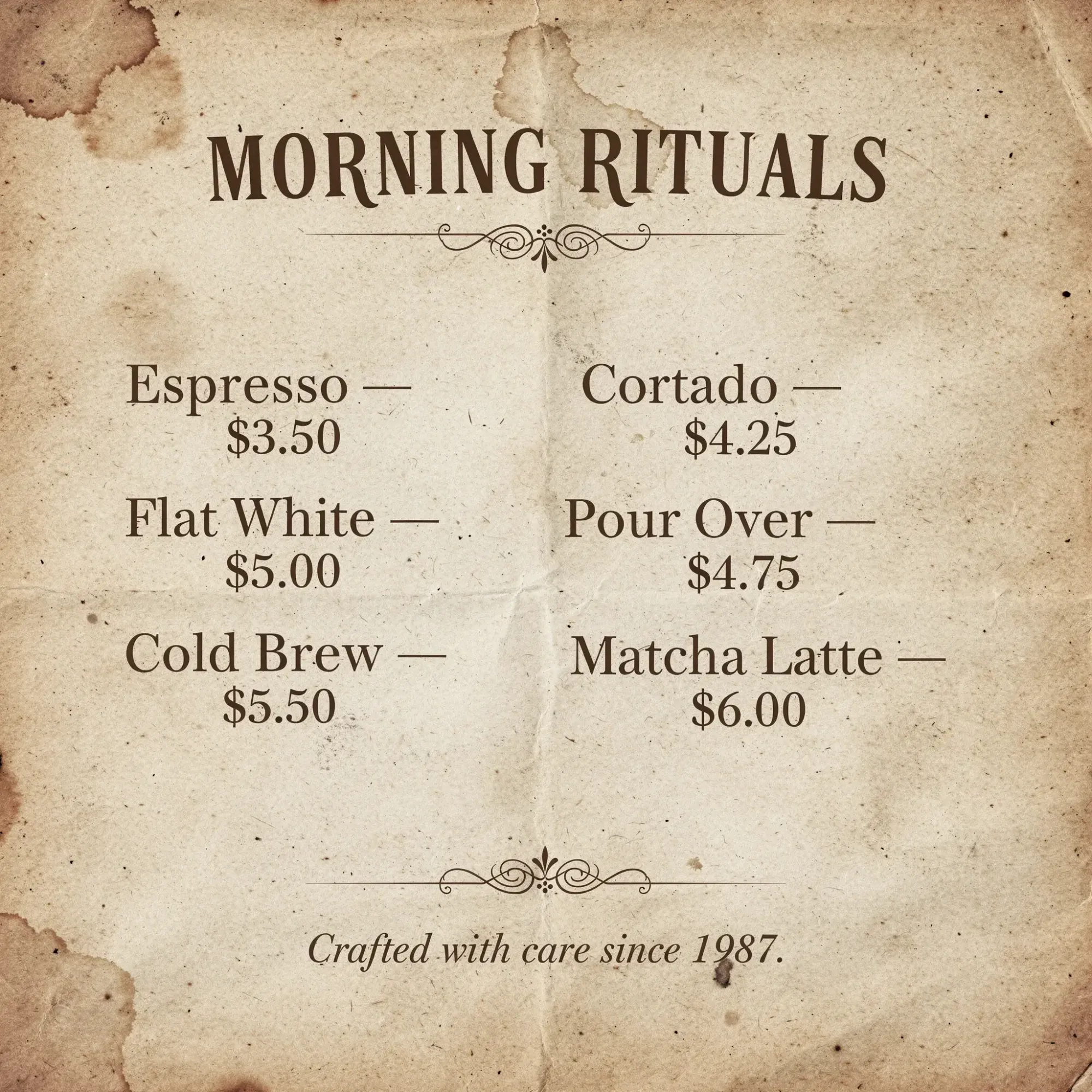
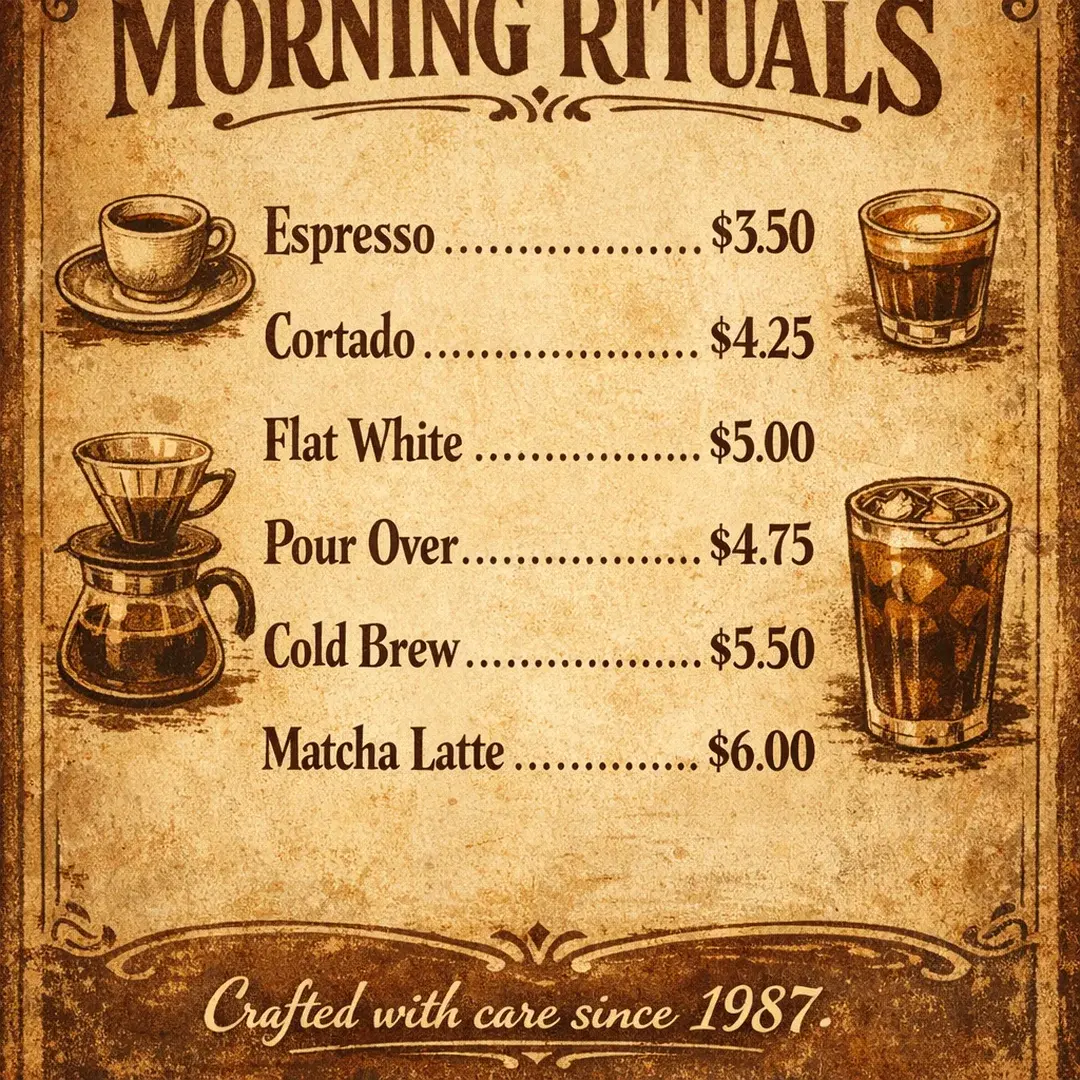
Prompt: Create a vintage coffee shop menu poster with the heading "MORNING RITUALS" in decorative serif font. Include 6 drink items with names and prices: Espresso $3.50, Cortado $4.25, Flat White $5.00, Pour Over $4.75, Cold Brew $5.50, Matcha Latte $6.00. Add a tagline at the bottom: "Crafted with care since 1987." Use warm brown tones and a weathered paper texture.
Result: Near-perfect accuracy — only a minor punctuation omission (missing period). Production-usable with minimal cleanup.
Real-time grounding
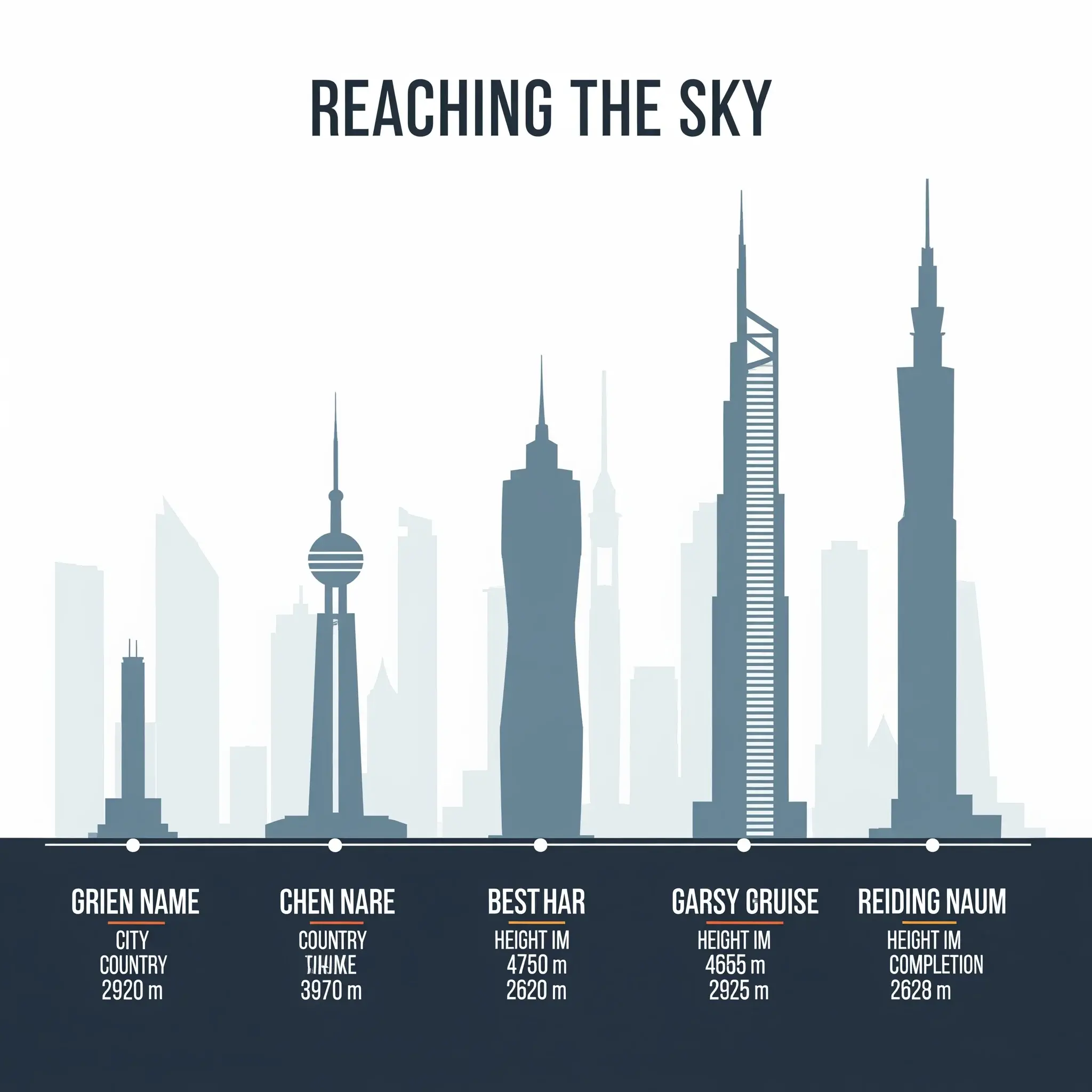
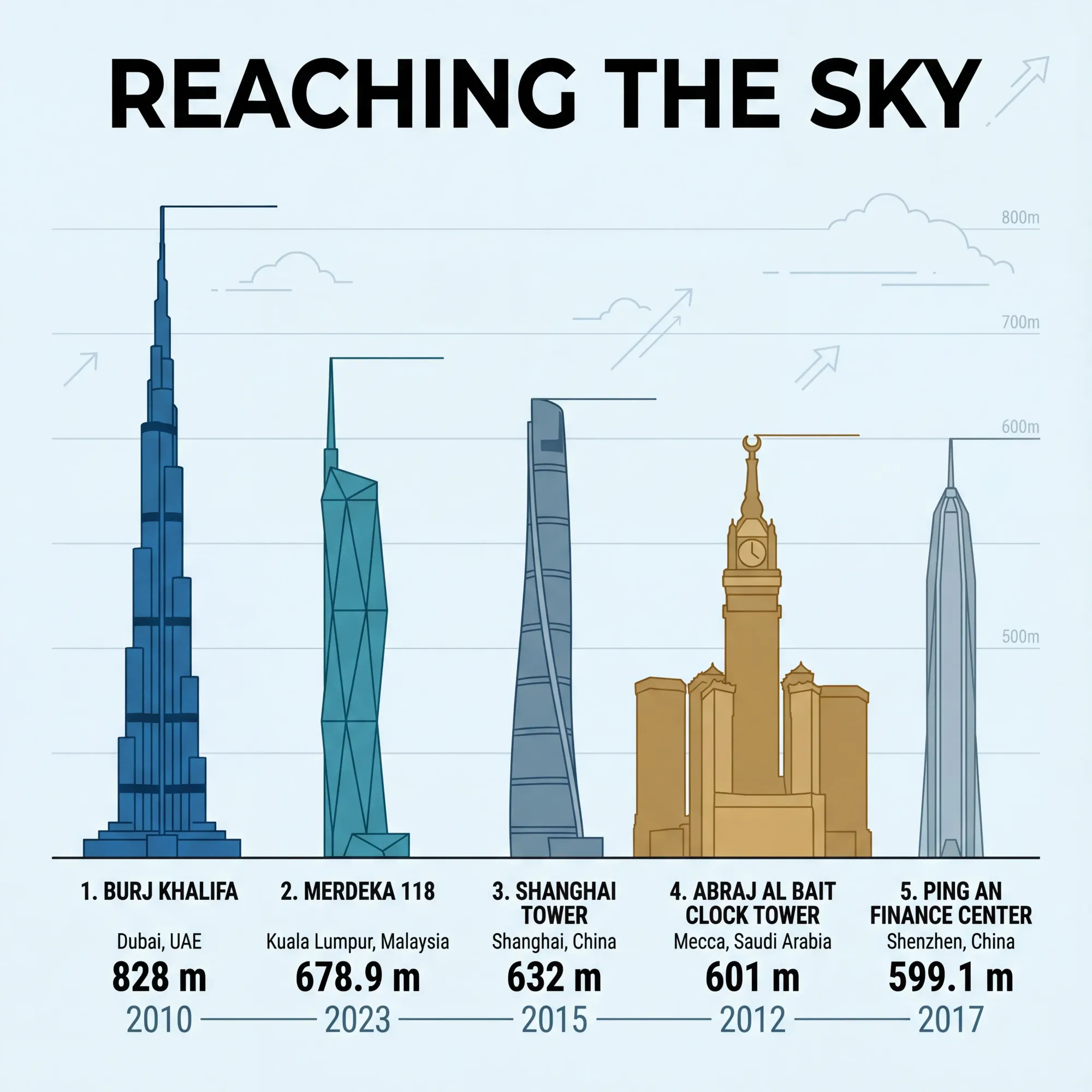
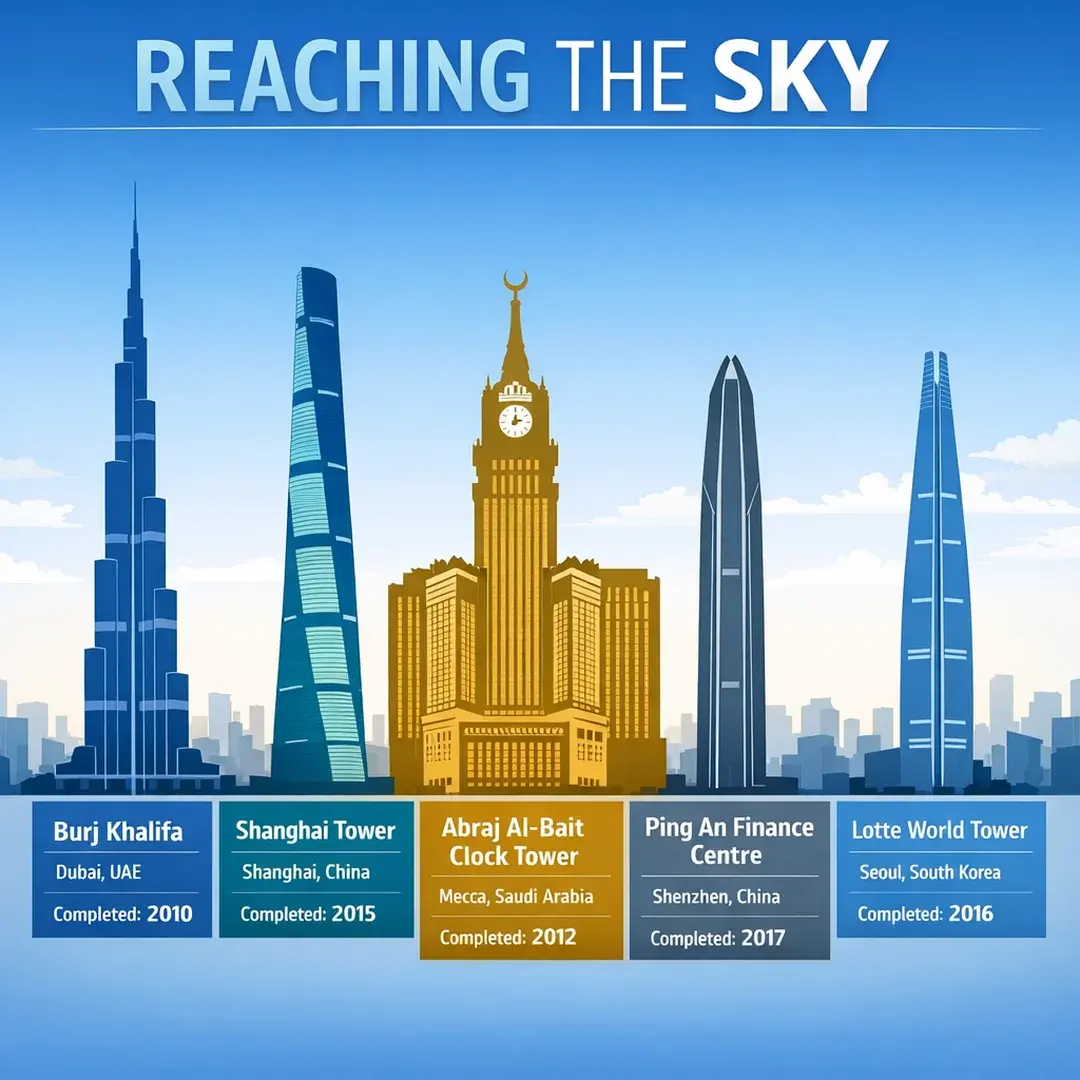
Prompt: Create an infographic showing the current top 5 tallest buildings in the world with their names, locations, heights in meters, and year completed. Use a clean modern design with building silhouettes arranged by height. Include a title "REACHING THE SKY" at the top.
Result: Failed entirely. Generated fictional building names and physically impossible heights. Diffusion-only models don't have real-world knowledge access.
Since Imagen 4 doesn't support image editing, we couldn't test surgical edits, character consistency, or localization.
Best for: Fast photorealistic generation, texture-heavy imagery, rapid creative exploration.
Nano Banana Pro / Gemini 3 Pro Image (Google DeepMind)
Why it's in our stack
Nano Banana Pro solved three problems that kept hitting our queue: garbled multilingual text, fake-looking complex scenes, and hallucinated data. It's become our go-to for anything that needs to feel like a real photograph — and for any content where facts matter.
What users say
The multilingual accuracy changed what's possible for global teams.
"Finally — Hindi text that's actually correct. We can ship to India now."
"Crowds look real. No more uncanny valley."
"The stats in the infographic are actually right. It pulled real data."
But iteration has limits.
"By the fifth edit, the face started drifting. Had to start over."
Strengths
Multilingual — Best-in-class text rendering across Japanese, Hindi, Arabic, and more
Not pixel-perfect — Surgical edits may introduce minor collateral changes
Speed — Standard generation time; no "fast mode" equivalent
From our tests
Text rendering
Prompt: Create a vintage coffee shop menu poster with the heading "MORNING RITUALS" in decorative serif font. Include 6 drink items with names and prices: Espresso $3.50, Cortado $4.25, Flat White $5.00, Pour Over $4.75, Cold Brew $5.50, Matcha Latte $6.00. Add a tagline at the bottom: "Crafted with care since 1987." Use warm brown tones and a weathered paper texture.
Result: 100% accuracy. Every drink name, price, and tagline rendered exactly as specified. Production-ready.
Real-time grounding
Prompt: Create an infographic showing the current top 5 tallest buildings in the world with their names, locations, heights in meters, and year completed. Use a clean modern design with building silhouettes arranged by height. Include a title "REACHING THE SKY" at the top.
Result: The only model to produce a factually accurate result. Correctly identified all five buildings with precise heights, locations, and completion dates — including Merdeka 118, which only became the world's second-tallest in 2023. Google Search grounding working exactly as intended.
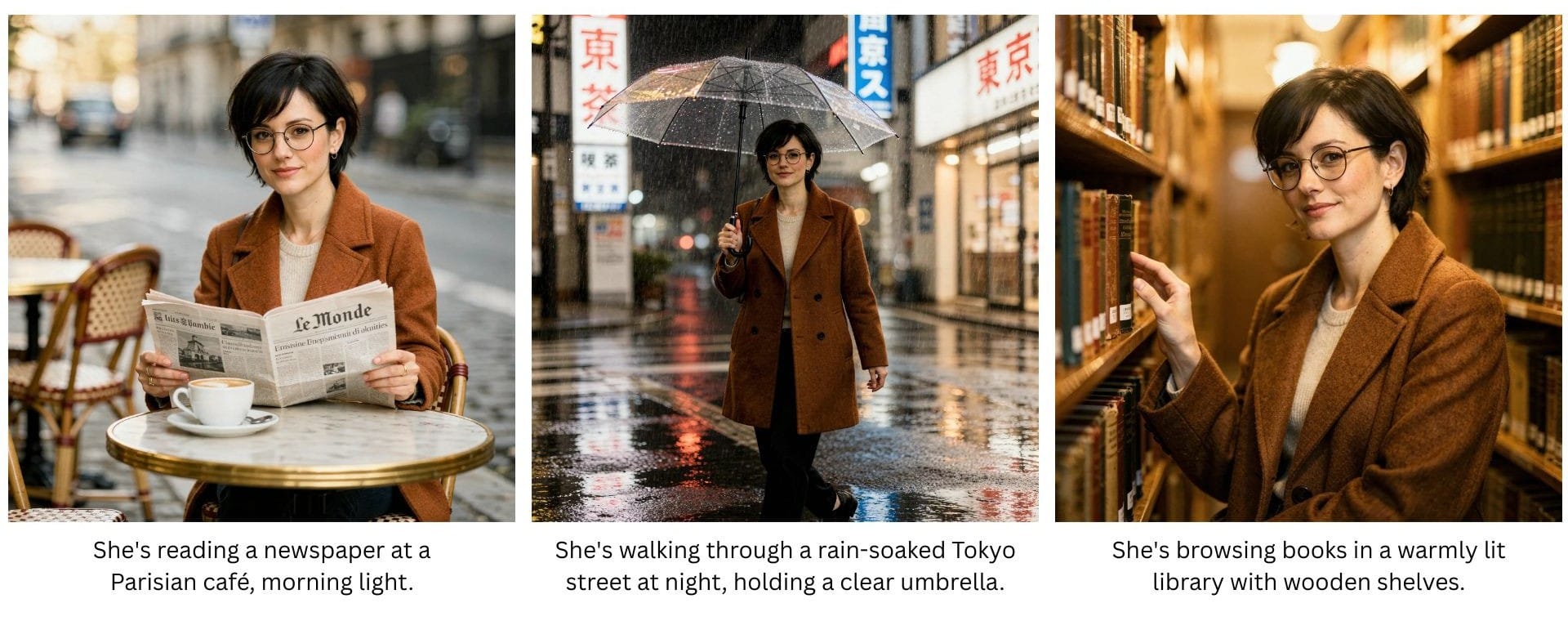
Character consistency
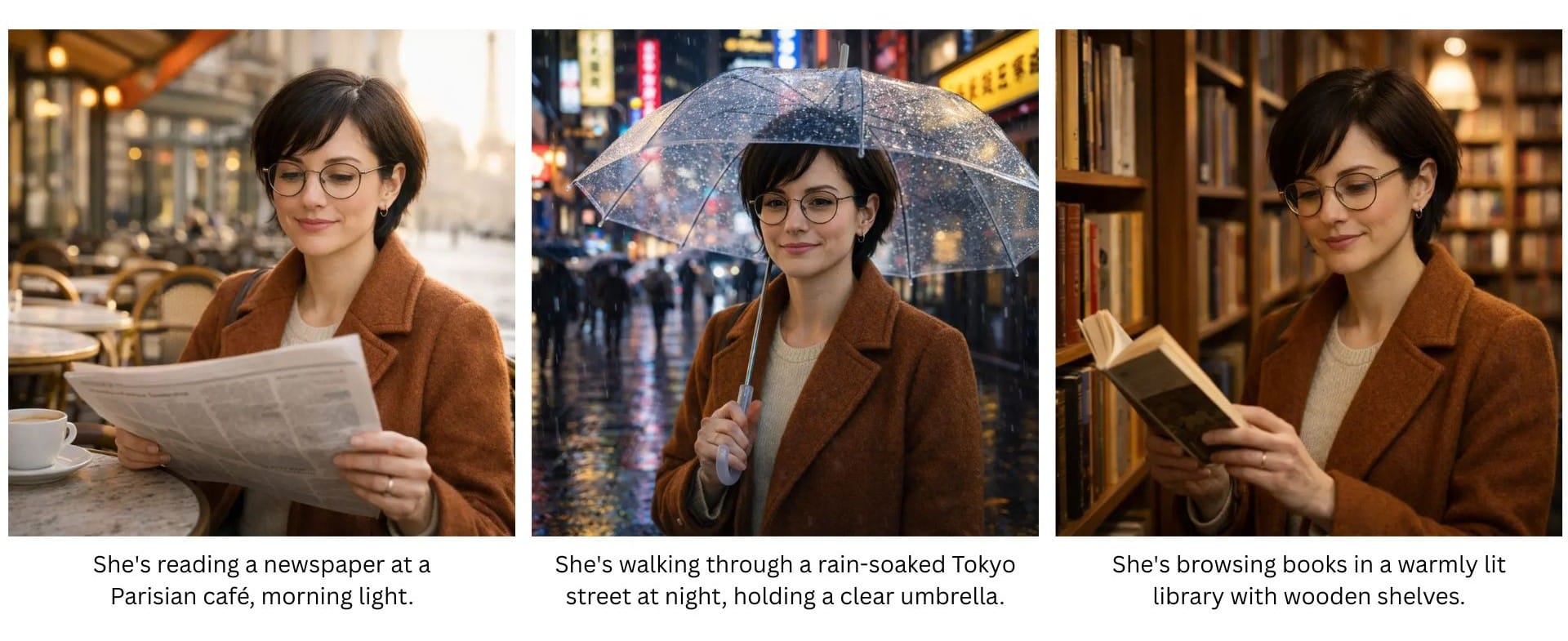
Base character
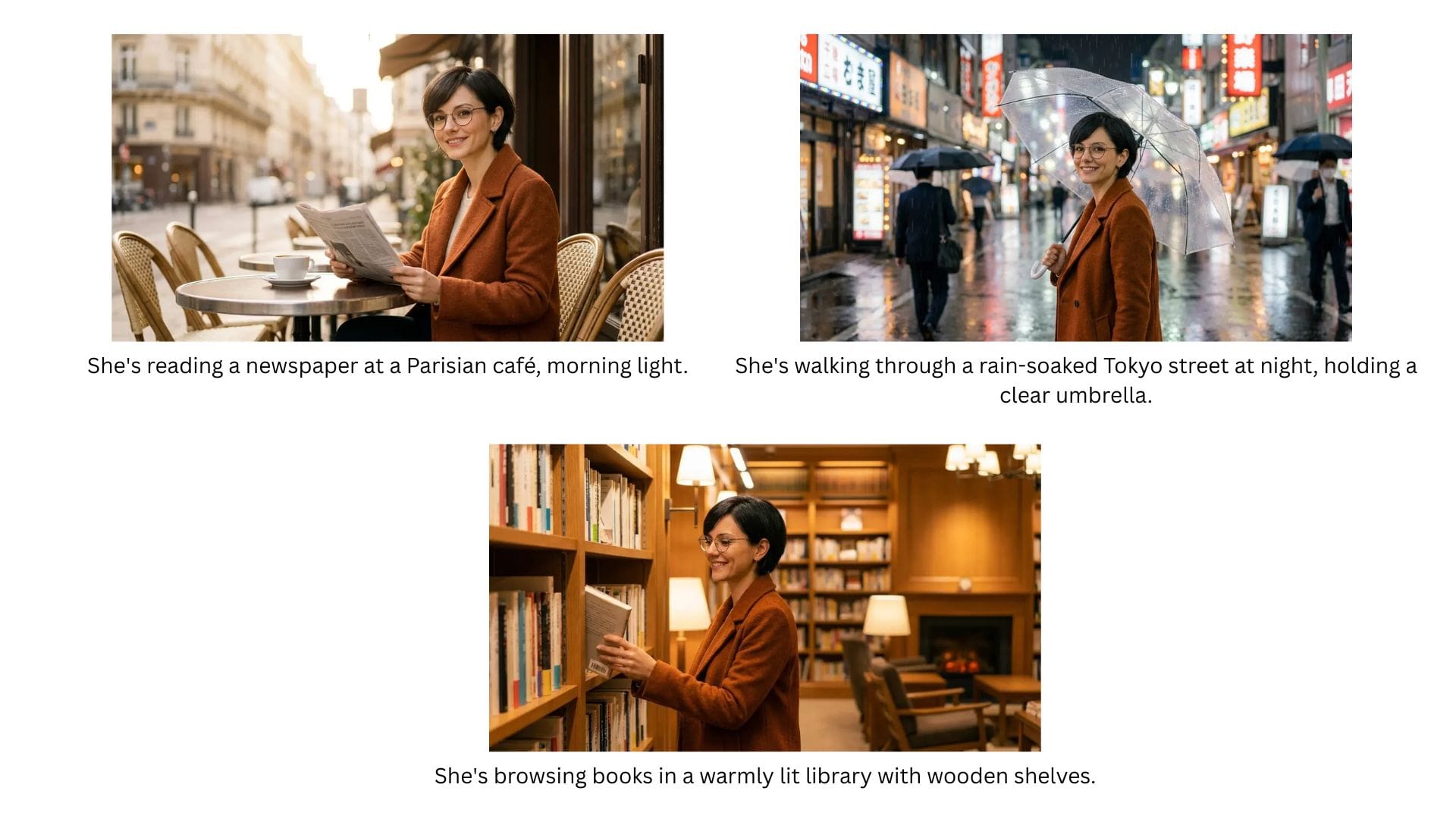
Result: Excellent. Same woman recognizable across Paris, Tokyo, and library scenes. Supports up to 14 reference images and maintains consistency across up to 5 different people simultaneously.
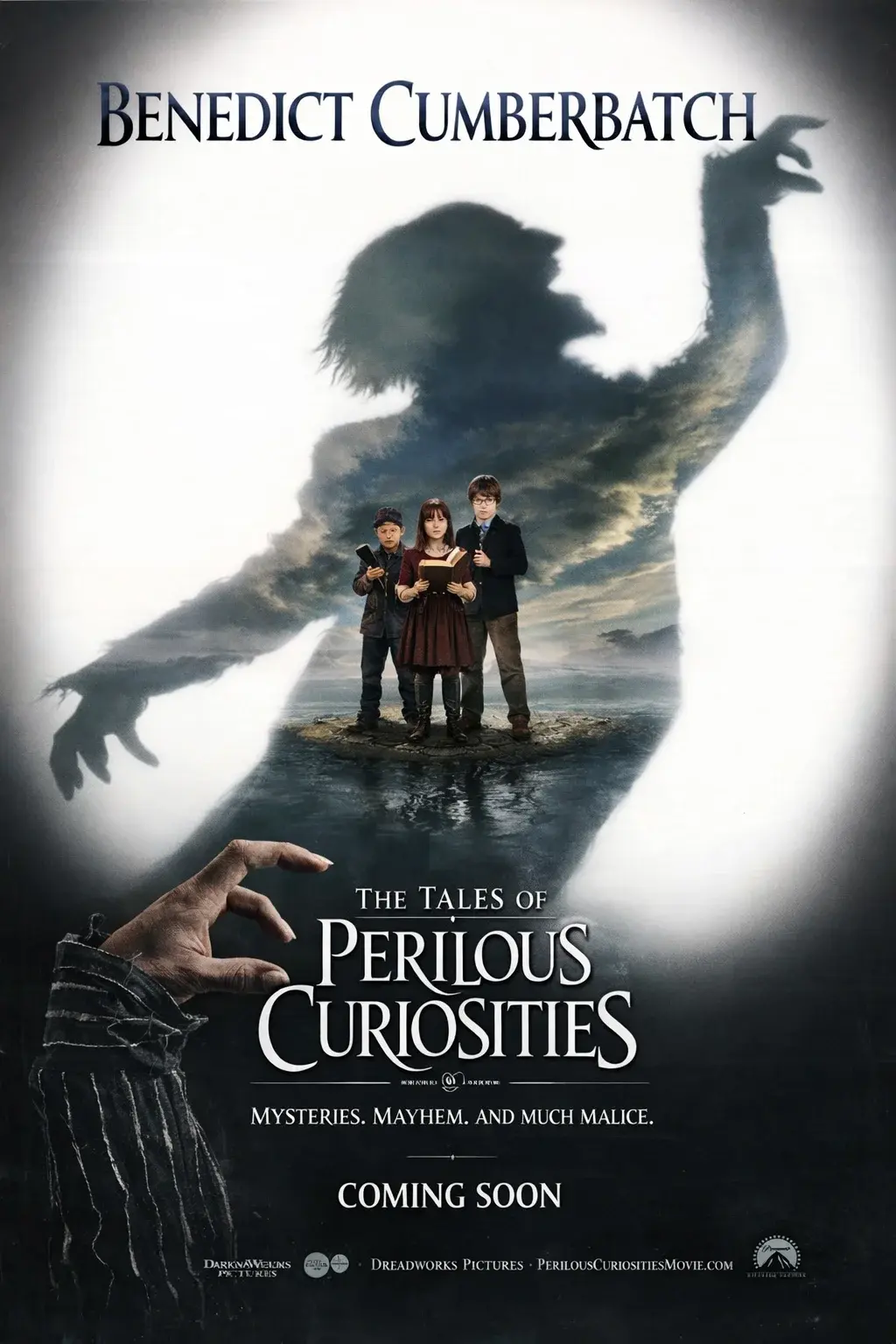
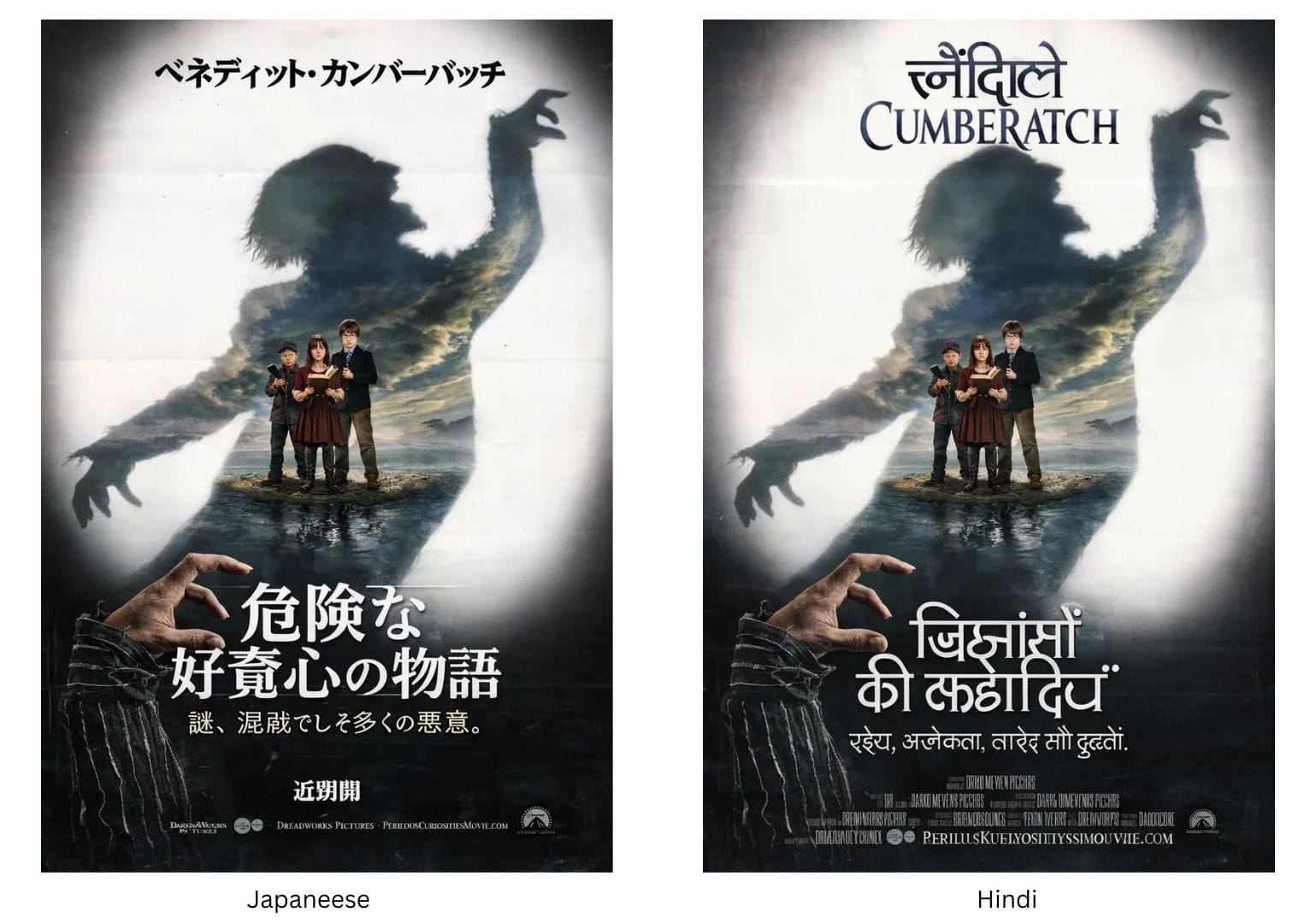
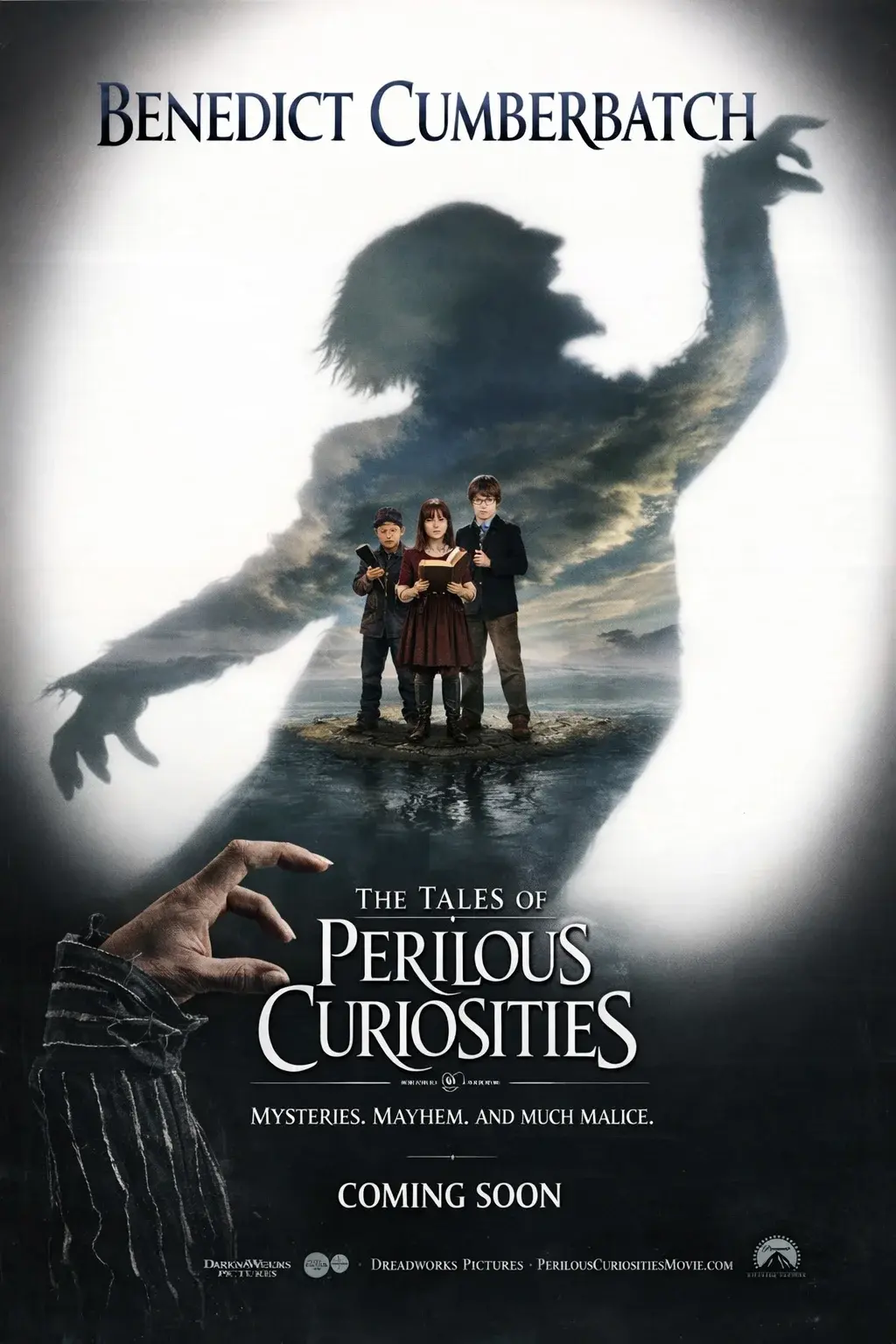
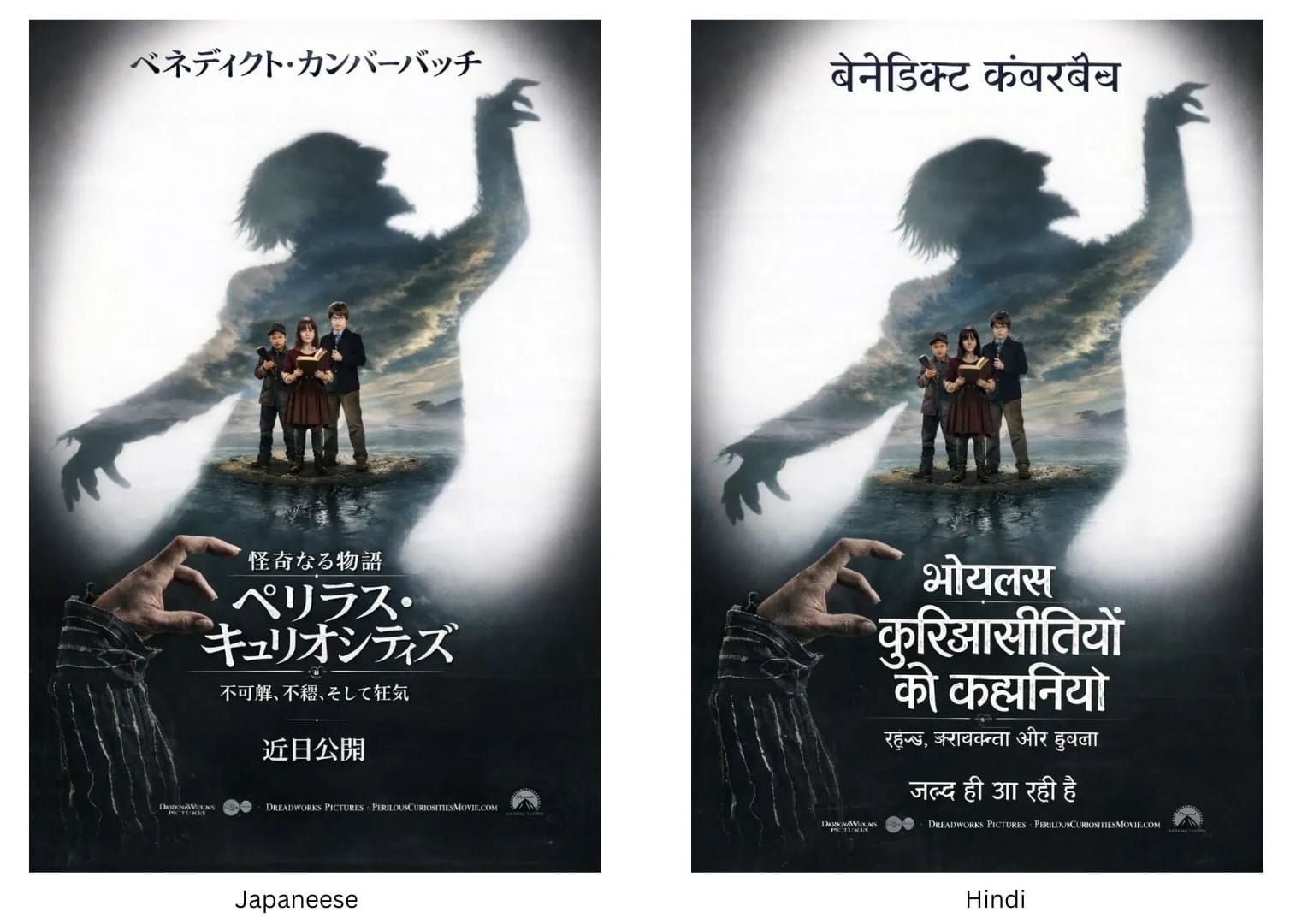
Localization
Base image
Result: Near-perfect Japanese. Serviceable Hindi — some transliteration issues but readable and layout preserved perfectly.
Photorealism
Prompt: A Viking longship cutting through rough, dark ocean waves, shot from a low, slightly off-center angle near the waterline. Jagged mountains loom in the distance under a stormy sky. Forked lightning illuminates the clouds behind the ship, creating dramatic rim light along the sails and hull. Cold rain and sea mist hang in the air, with volumetric lighting visible through the fog. The scene is photorealistic and high-resolution, captured in the style of a Hasselblad X2D 100C, shallow depth of field with crisp foreground detail and softly fading background. HDR processing enhances contrast and texture while preserving a moody, atmospheric look.
Result: Most authentically "photographic" result. Volumetric god rays, muted color palette, atmospheric layering closest to actual Hasselblad medium format output.
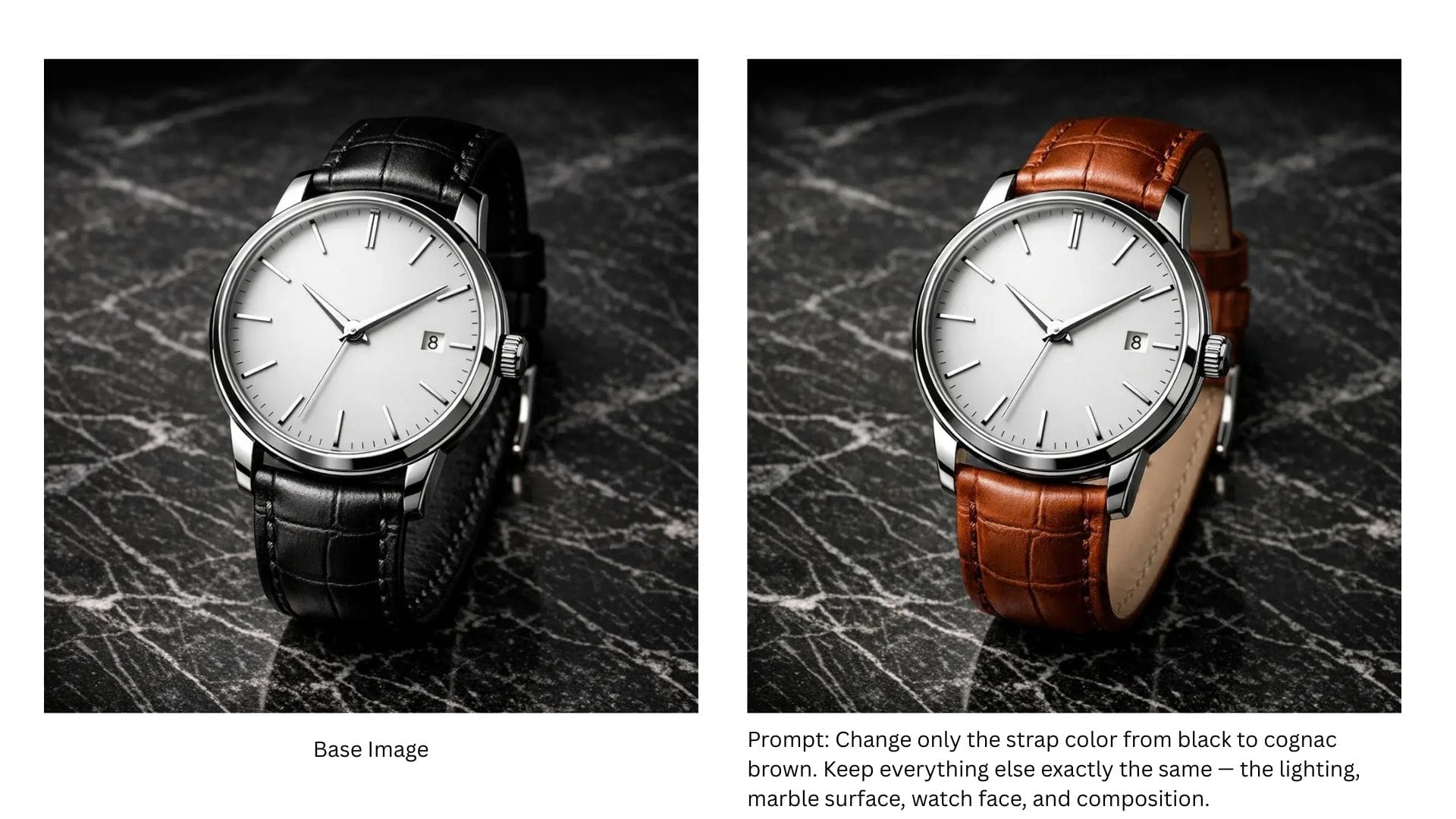
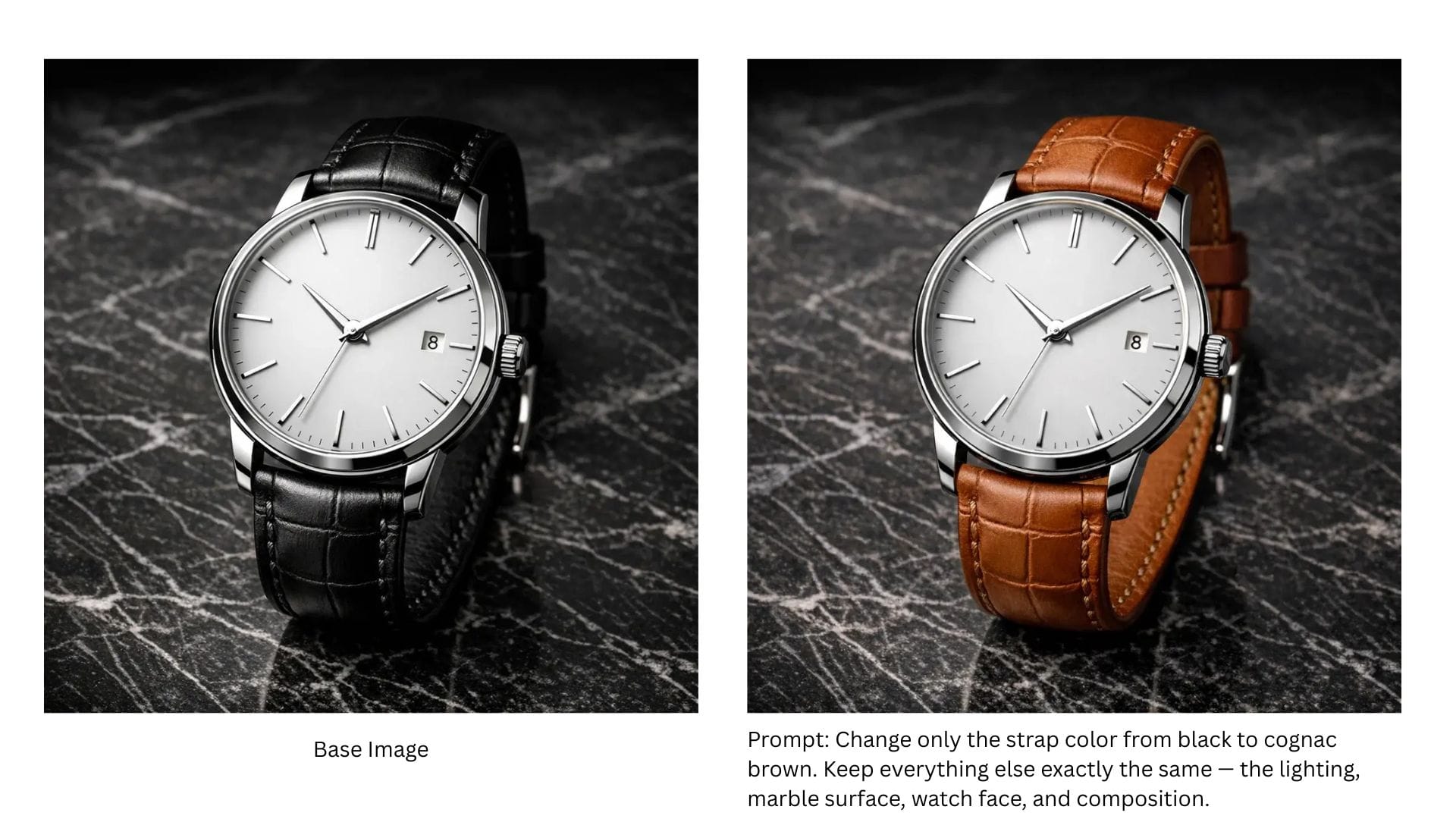
Surgical edit
Result: Successfully changed the strap color but introduced minor collateral changes to lighting and strap curvature. Good, not pixel-perfect.
You can read more about our hands-on experience with the Nano Banana Pro here.
Best for: Photorealism, multilingual assets, factual infographics, complex scenes.
FLUX 2 Max (Black Forest Labs)
Why it's in our stack
FLUX entered our toolkit to solve two problems other models couldn't: lighting precision and product consistency. I've been experimenting with it primarily for relighting workflows — earlier attempts with open-source models had limited precision; shadows fell wrong, light color didn't match the scene. FLUX fixed that. And with FLUX.1 Kontext and quick LoRA training, we can lock product identity across dozens of ad variants.
What users say
The precision is what users notice first.
"Finally — the shadows actually make sense."
"Product color stays exactly the same across every ad."
"The relighting actually looks physically correct now."
But the compute requirements mean it's not for every use case.
Color precision — Hex-code matching with no approximation; critical for brand work
Character consistency — Strongest in class; supports up to 10 reference images
Open weights — Flux 2 Dev allows self-hosting without API dependencies
FLUX.1 Kontext — Multi-reference generation and quick LoRA training for consistent product imagery
Limitations
Compute heavy — ~90GB VRAM full, ~64GB lowVRAM mode; demanding to self-host
Ecosystem — Still developing compared to Stable Diffusion's mature tooling
Multilingual — Strong on CJK scripts, weak on Indic scripts (Hindi produced gibberish)
From our tests
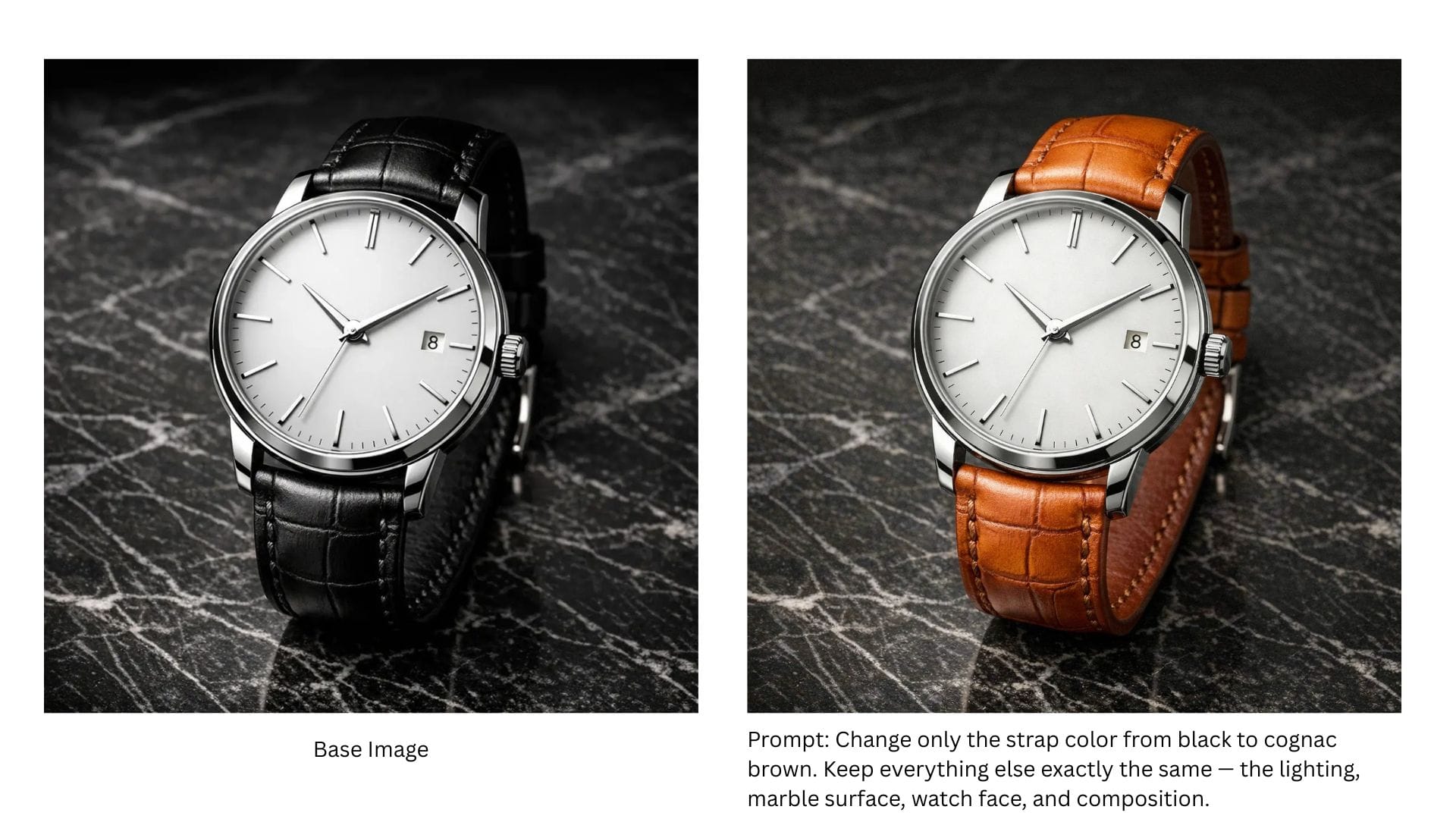
Surgical edit
Result: FLUX 2 Max delivered the most precise edit — changed only the strap color while preserving marble veining, shadow direction, and exact watch positioning. Pixel-level precision ideal for e-commerce variants.
Character consistency
Base character
Result: Exceptional. Unmistakably the same person across all three scenes — hair, glasses, coat texture, even earring placement matched. FLUX supports up to 10 reference images and officially claims "state-of-the-art character consistency."
Photorealism
Prompt: A Viking longship cutting through rough, dark ocean waves, shot from a low, slightly off-center angle near the waterline. Jagged mountains loom in the distance under a stormy sky. Forked lightning illuminates the clouds behind the ship, creating dramatic rim light along the sails and hull. Cold rain and sea mist hang in the air, with volumetric lighting visible through the fog. The scene is photorealistic and high-resolution, captured in the style of a Hasselblad X2D 100C, shallow depth of field with crisp foreground detail and softly fading background. HDR processing enhances contrast and texture while preserving a moody, atmospheric look.
Result: Most technically complete image. Every prompt element rendered with high fidelity — water spray physics, wood grain texture, atmospheric depth.
Localization
Base image
Result: Japanese was adequate. Hindi failed — produced gibberish despite preserving layout. Stronger training on CJK scripts than Indic scripts.
Text rendering
Prompt: Create a vintage coffee shop menu poster with the heading "MORNING RITUALS" in decorative serif font. Include 6 drink items with names and prices: Espresso $3.50, Cortado $4.25, Flat White $5.00, Pour Over $4.75, Cold Brew $5.50, Matcha Latte $6.00. Add a tagline at the bottom: "Crafted with care since 1987." Use warm brown tones and a weathered paper texture.
Result: 100% accuracy. Production-ready.
Best for: Relighting, self-hosted deployment, multi-reference generation, brand-exact color matching.
GPT Image 1.5 (OpenAI)
Why it's in our stack
GPT Image 1.5 finally gave us surgical precision. When users ask to change a product color, only the color changes. Adjust a headline, and the product stays put. The iterative editing loop — describe what's wrong, get a fix, refine further — finally works the way users expect.
What users say
The precision is what users notice immediately.
"I changed the background and nothing else moved. That's never happened before."
"The editing actually feels like editing now, not regenerating and hoping."
"English text is bulletproof."
But multilingual work remains a gap.
"Hindi came back garbled. Had to switch to Gemini for that."
"Multiple faces in a scene — it gets confused about who's who."
Strengths
Edit precision — Best-in-class; changes exactly what you ask, preserves everything else
Instruction following — Superior understanding of intent; natural iterative workflow
Text rendering — Strong on English headlines, CTAs, product labels
Localization — Best layout preservation when translating existing images
Multi-reference — Supports up to 16 input images (first 5 at higher fidelity)
Limitations
Multilingual generation — Weak on Hindi, Arabic, and non-Latin scripts
Multiple faces — Identity confusion in crowded scenes
Resolution — Limited to 1536×1024 / 1024×1536
No grounding — Relies on training data; missed Merdeka 118 in our buildings test
From our tests
Surgical edit
Result: Excellent. Executed the color swap cleanly with only subtle recomposition — may or may not matter depending on use case, but the edit itself was precise.
Localization
Base image
Result: Best performance of all models. Grammatically correct, culturally appropriate translations in both languages while perfectly preserving original layout, characters, and visual hierarchy. The model understood "replace text" not "regenerate image."
Text rendering
Prompt: Create a vintage coffee shop menu poster with the heading "MORNING RITUALS" in decorative serif font. Include 6 drink items with names and prices: Espresso $3.50, Cortado $4.25, Flat White $5.00, Pour Over $4.75, Cold Brew $5.50, Matcha Latte $6.00. Add a tagline at the bottom: "Crafted with care since 1987." Use warm brown tones and a weathered paper texture.
Result: 100% accuracy. Production-ready.
Character consistency
Base character
Result: Very good. Recognizable as the same character with minor expression variations that don't break identity. Supports up to 16 input images with the first 5 preserved at higher fidelity.
Photorealism
Prompt: A Viking longship cutting through rough, dark ocean waves, shot from a low, slightly off-center angle near the waterline. Jagged mountains loom in the distance under a stormy sky. Forked lightning illuminates the clouds behind the ship, creating dramatic rim light along the sails and hull. Cold rain and sea mist hang in the air, with volumetric lighting visible through the fog. The scene is photorealistic and high-resolution, captured in the style of a Hasselblad X2D 100C, shallow depth of field with crisp foreground detail and softly fading background. HDR processing enhances contrast and texture while preserving a moody, atmospheric look.
Result: Matched FLUX in detail while adding narrative energy — visible crew, dramatic action composition. High quality.
Real-time grounding
Prompt: Create an infographic showing the current top 5 tallest buildings in the world with their names, locations, heights in meters, and year completed. Use a clean modern design with building silhouettes arranged by height. Include a title "REACHING THE SKY" at the top.
Result: Clean visuals, mostly accurate data, but relied on pre-2023 training knowledge — missed Merdeka 118. No real-time grounding capability.
Best for: Iterative editing, precise instruction following, localization workflows.
Capability matrix
This capability matrix compares modern image generation models across resolution, text rendering, editing precision, character consistency, and ecosystem maturity.
Capability
GPT Image 1.5
Nano Banana Pro
Imagen 4
FLUX.2 [max]
Max Resolution
1536×1024 (landscape) or 1024×1536 (portrait)
2K native / 4K upscaled
2K
4MP
Text Rendering
Strong
Best-in-class
Strong
Excellent
Multi-Reference Input
Upto 16 (First 5 input images preserved with higher fidelity)
Up to 14 images
Limited
Up to 10 images
Real-Time Grounding
No
Yes (Google Search)
No
Yes (web context)
Inpainting / Fill
Excellent
Strong
No, check predecessors for this feature
Excellent
Character Consistency
Strong
Strong (up to 5 people)
Moderate
Strongest
Multilingual Text
Good
Excellent
Good
Good
Edit Precision
Best-in-class
Strong
Moderate
Strong
Speed
4x faster than predecessor
Standard
Up to 10x (Fast mode)
Standard
Open Weights Available
No
No
No
Yes (FLUX.2 [dev])
Ecosystem
ChatGPT, API
Gemini, Workspace, Adobe, Figma
Vertex AI, Gemini API, Workspace
API, Replicate, fal.ai, self-hosted
Conclusion
There's no single 'best' image generation model in 2025 — only the best fit for your specific workflow. If your priority is iterative editing precision, GPT Image 1.5 delivers. If you need multilingual marketing assets with accurate text, Nano Banana Pro is unmatched. For raw photorealism and speed, Imagen 4 Fast outpaces the field. When brand-exact colors and character consistency matter most, FLUX.2 [max] offers the control. Pick based on what you're building, not on leaderboard rankings alone.
FAQs
1.Which image generation models are actually usable in production today?
Models like GPT Image 1.5, Nano Banana Pro, and FLUX.2 max are production-viable because they support reference images, consistent edits, and predictable outputs. Diffusion-only models like Imagen 4 remain better suited for exploration rather than shipping workflows.
2.Which image generation models handle text and infographics reliably?
Nano Banana Pro stands out because it grounds outputs in Google Search data and renders multilingual text accurately. Models without real-time grounding often hallucinate statistics or introduce spelling errors, making them risky for factual visuals.
3.How important is multi-reference input for character consistency?
Multi-reference input is essential when the same person or product appears across multiple scenes. Models like FLUX.2 max, Nano Banana Pro, and GPT Image 1.5 are architected to preserve identity, while pure diffusion models regenerate identity every time.
Not entirely, but they reduce reliance on fragile prompts. Multimodal models understand context through reference images, prior iterations, and brand inputs, shifting effort from prompt hacking to creative decision-making.