Our team tested how Frontend AI supports real React development workflows using ChatGPT.
AI handled UI utilities, hooks, and simple layouts well, but struggled with consistency and context.
Deployment, Terraform, and infrastructure work required deeper human intervention despite AI guidance.
In the first part of our blog series, we explored the immense potential of leveraging AI-assisted development with ChatGPT 3.0. We shared our experiences with generating backend code for an Employee Portal application and highlighted both the advantages and limitations. In this second part, we move deeper into the frontend AI experience and take you through the journey of deploying the application. We discuss how AI shaped our approach during each stage of development and uncover the challenges and opportunities we encountered.
How did ChatGPT influence our frontend development process?
Frontend
The frontend application was decided to be built on React using the create-react-app boilerplate. This portion did not require any inputs from ChatGPT as this is mostly dependent on the team’s preference. We had a figma design in hand to follow. The first task was to create different UI layouts and views which act as a skeleton to the whole application. We had a login page, employee list page, employee view page, employee edit page, and employee create page. All of the pages except the login page had a header and left navigation. So we gave all these inputs to ChatGPT in a single prompt and asked it to create the code for basic layout, routing, and the login form. ChatGPT provided the code for the layouts and routing, but it belonged to an older version of react-router. As we did not receive the output as expected, we specified the required react-router version in our next prompt. For this, ChatGPT replied with another code set with different naming conventions and coding structures. This was a bit challenging because we had to fit the new react-router code into the previous code given by ChatGPT. In short, we had to do a bit of manual work to get the ChatGPT’s code working. The login form was good and clean, though. This part of the journey helped us understand where frontend AI works well and where manual developer intervention becomes essential.
What prompts worked for frontend layouts and routing?
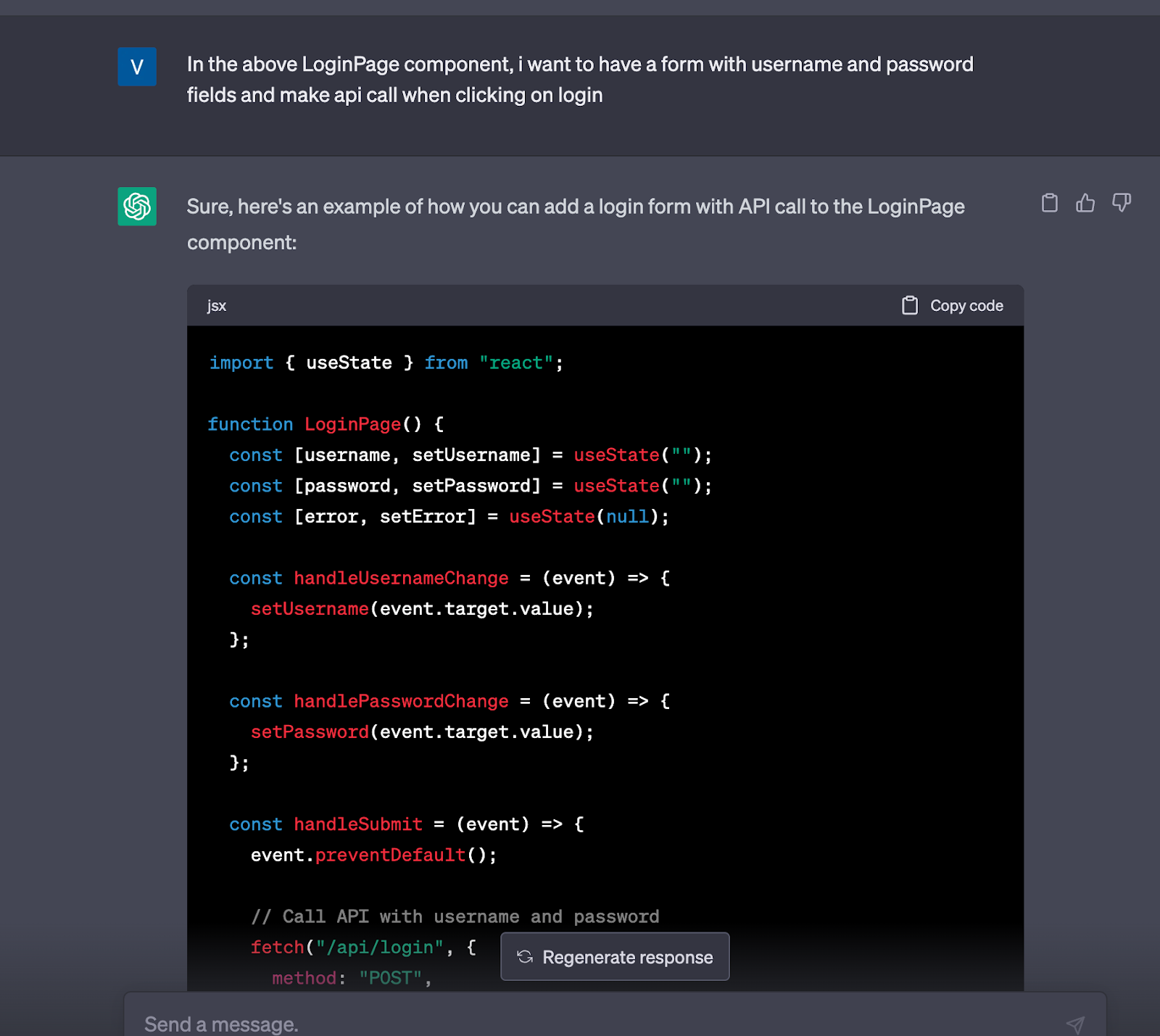
Prompt for the login form React
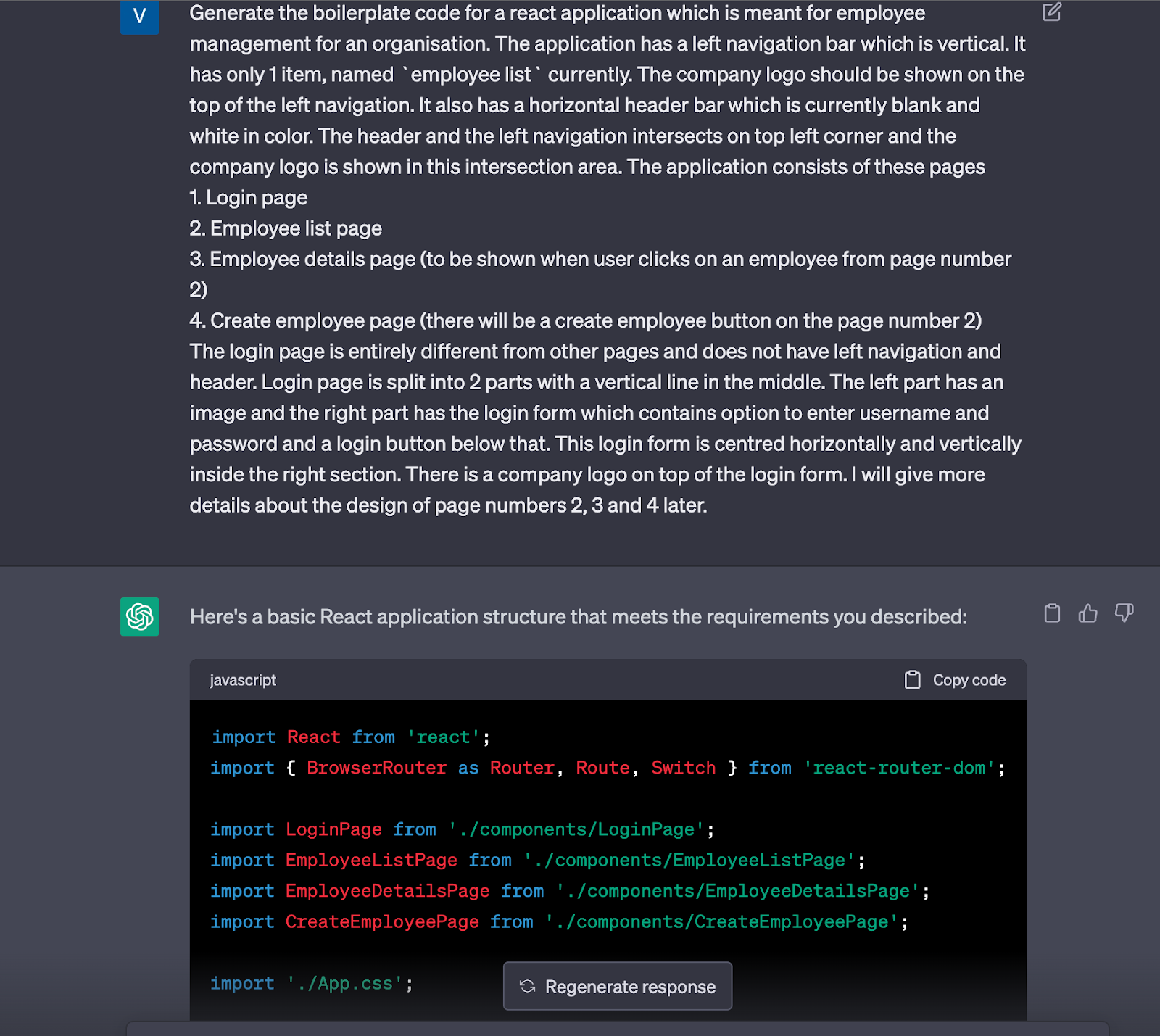
Further, we gave the prompt by converting the design to natural language to the best of our ability. This helped in getting a basic html/CSS layout from ChatGPT. For example, the login page design was in such a way that there were two parts divided vertically by a line.
Prompt and response for the basic layout in React
Where did frontend AI struggle with consistency?
One of the major challenges in terms of frontend development was that ChatGPT was giving different styles of code for the same prompt without checking the previous context. For instance, in response to the initial prompt for the basic layout, we were given the code with the previous version of the react-router which was not compatible with the latest version. When this was pointed out and prompted again, ChatGPT was able to provide the code working with the latest react-router version, but this time, all the layout namings were different from the older response. Another instance was when we prompted ChatGPT to style the table in a certain way, the CSS provided was not working well. In fact, it tried to add certain styles which never work with tr and td elements. When the mistake was pointed out and prompted again, it corrected the mistake, but this time it gave entirely new CSS classes and styles which were different from the original response. In fact, some styles which were working in the initial response were mistakenly changed and the application stopped working. This was challenging because we had to manually work to fit the new code to the old code given by ChatGPT. Another challenge was to obtain the CSS code to match the Figma design. This was impossible using ChatGPT because we could not convert the Figma design to the ChatGPT prompt. This caused spending more manual effort during the development.
This inconsistency highlighted one of the main limitations of using frontend AI tools in production code. While ChatGPT handled individual prompts well, maintaining state across multiple related UI components was challenging.
What tasks did AI handle well in the frontend?
Despite the drawbacks in handling code consistency, ChatGPT really shines when it comes to generating well-structured code for specific logic or utility functions. Especially when the application context is not required for the functionality. It was able to provide common functions like API call utilities, date time utilities, etc very effectively. The code generated was of very good quality in these cases. If you want a function to make API calls using Axios, it is fairly simple using ChatGPT because it will handle the task of going through the docs and generating the best code.
Also, ChatGPT was successful in producing API hooks. On prompting the details of the sample response, it generated a well-written hook that handled loading, error, and response states. It also produced the code for how and where to use the hook in our code, hence making the process of API integration much easier.
In fact, these reusable utilities are one of the strongest use cases of AI assisted frontend development.
Why was unit testing difficult with frontend AI tools?
Challenges faced in unit testing
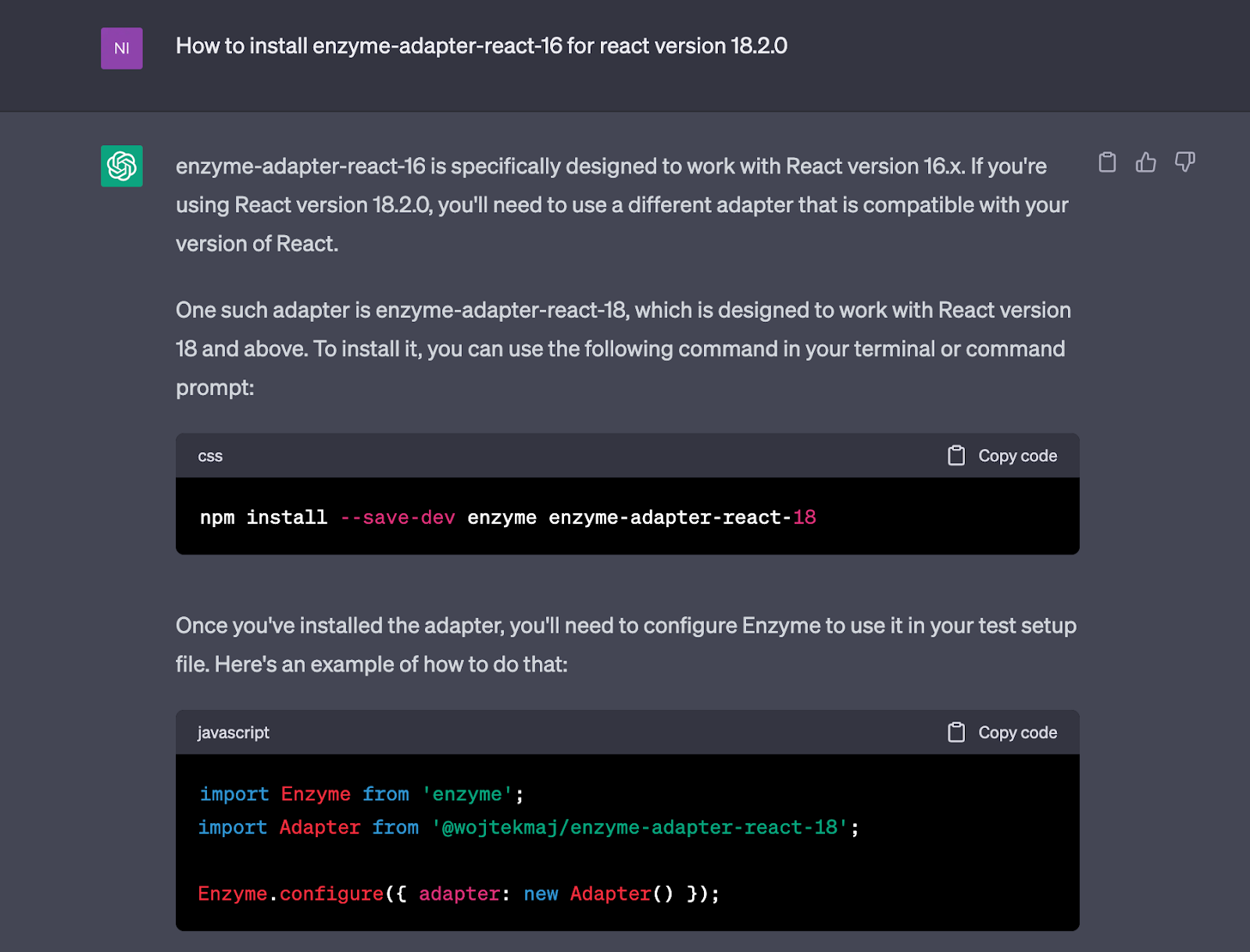
Writing unit tests for the front-end using Jest through ChatGPT proved to be a laborious process. The continuous loss of context and occasional random responses created challenges. We recall an incident where ChatGPT generated a unit test utilizing the 'enzyme-adapter-react-16' package. However, when executing the tests, we encountered compatibility issues because this package was incompatible with the version of React employed in our application (React 18). Seeking guidance on resolving this error, ChatGPT recommended using the 'enzyme-adapter-react-18' package and even provided the installation command. Unfortunately, such a package did not exist, leading to ChatGPT providing inaccurate information.
When ChatGPT provided inaccurate information
How did AI perform during CI/CD and deployment?
Deployment
We decided to use GitHub for hosting the code base and added the GitHub Actions file for CICD. This file would build and push the corresponding Docker image to the ECR repo, where permissions are granted via the service account.
After completing the CI/CD setup, our next step was to create the infrastructure for service deployment. We opted to use Terraform for infrastructure provisioning. We needed to create a VPC with private and public subnets, along with the ECS and RDS resources.
What challenges did we face with Terraform, ECS, and VPC setup?
Creating the VPC proved to be a challenge. Initially, we instructed ChatGPT to create a VPC with private and public subnets. However, ChatGPT could not automatically handle dependencies like NAT, Internet Gateway, and security groups. This led to inaccurate configurations, false flags, and errors. So, we had to guide ChatGPT with details. Correcting these issues required careful analysis of error codes and applying appropriate fixes.
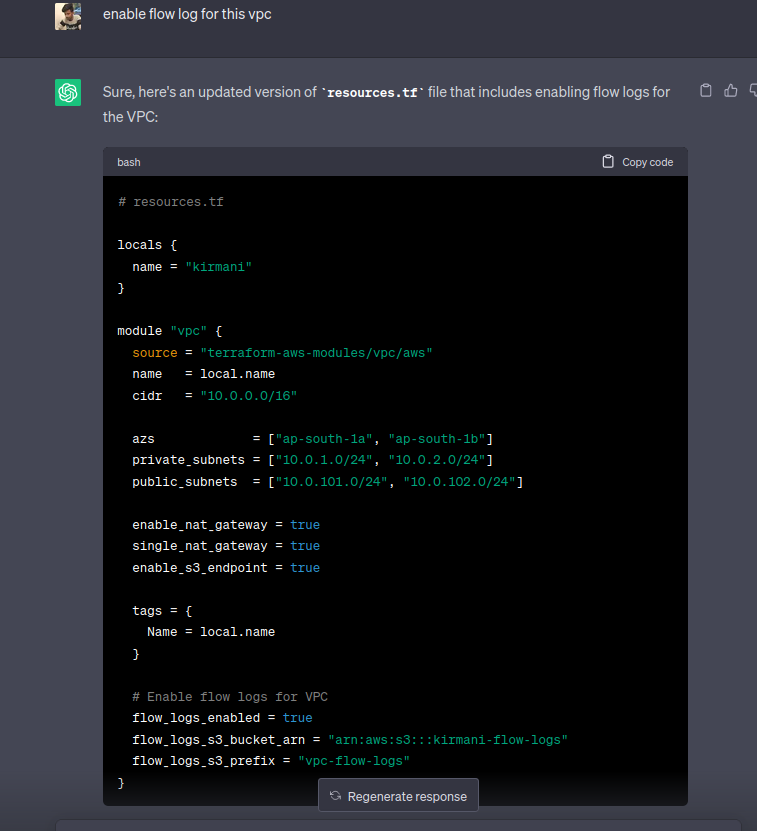
For example, when we attempted to enable VPC flow logs, it created flags that did not exist. Additionally, we explicitly had to specify all dependent resources individually, attaching one of the scenarios below.
ChatGPT’s assistance in enabling flow-log-feature VPC
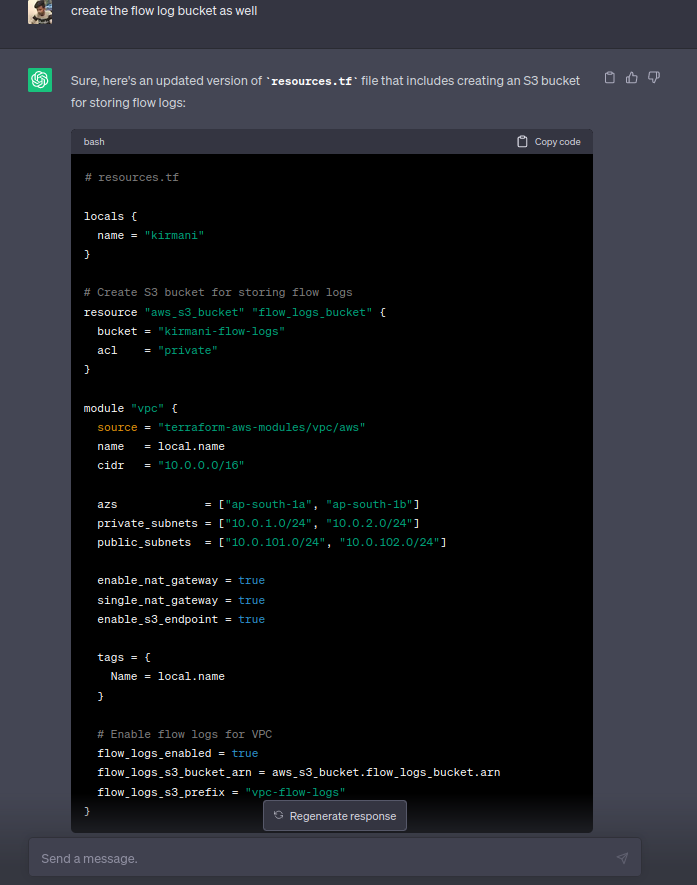
In this scenario, we are requesting ChatGPT to enable flow logs in the VPC. However, it is essential to note that the VPC module alone does not automatically create the required dependent resource, such as an S3 bucket. We needed to explicitly mention the creation of the S3 bucket resource along with its configuration to ChatGPT, ensuring that the necessary components are included and properly interconnected to enable flow log functionality in the VPC.
ChatGPT’s assistance in creating a depending resource
Creating the RDS instance, on the other hand, was relatively straightforward with fewer dependencies involved. It required minimal manual guidance.
One of the most demanding aspects involved in the project was the configuration of ECS and resource mapping within the VPC. The usage of ChatGPT in this particular context presented challenges, particularly when it failed to retain crucial context information. Despite providing the necessary context, ChatGPT occasionally produced code rewrites and incorrect ECS configurations without any need. Rectifying these errors required substantial effort, and we found ourselves providing explicit guidance and suggestions to ensure ChatGPT generated accurate responses.
Want to build smarter with AI-assisted development?
Talk to KeyValue’s engineering team to explore how AI-driven workflows can accelerate your next product.
What was our overall learning from using AI throughout the stack?
In the overall experience of working with ChatGPT to establish the infrastructure, the process resembled more of a teaching and guiding role rather than complete reliance on the model for code generation. Although ChatGPT offered suggestions and valuable insights, entrusting it with the entire codebase creation posed significant risks. It became apparent that a profound understanding of Terraform and expertise in the specific technology were vital for effective collaboration with ChatGPT and making well-informed decisions. Heavily depending on ChatGPT for comprehensive code generation can introduce errors and complications due to its limitations and the possibility of incorrect configurations or false indications. Therefore, adopting a collaborative approach where human expertise guides and validates the generated code remains indispensable for ensuring successful implementation.
How the GPT-5.1 update impacts frontend AI development
Recently, OpenAI released GPT-5.1, which includes two model variants (“Instant” and “Thinking”) and improvements such as better instruction-following, adaptive reasoning, warmer tone, and reduced hallucinations.
From a frontend AI development perspective, these updates matter in the following ways:
More reliable code generation: With enhanced instruction-following and “thinking” mode for complex tasks, GPT-5.1 may reduce the kinds of routing, version mismatch, or CSS inconsistencies we experienced.
Better context handling: The adaptive reasoning means the model is more likely to maintain multi-turn context (e.g., multiple UI components or prompt threads), which is crucial for frontend development tasks where consistency across layouts matters.
Faster iteration for simple tasks: The “Instant” variant is optimized for speed on simpler prompts — useful for generating UI skeletons, boilerplate components, or routing code quickly.
Still human-in-the-loop required: Despite the upgrade, our experience suggests that infrastructure and multi-component integration (frontend + backend + CI/CD) still require developer oversight. GPT-5.1 improves the assistant layer but does not replace domain expertise.
Takeaway: If you’re using AI for frontend development, upgrading or switching to GPT-5.1 (or equivalent) is worth exploring — but view it as a tool enhancement, not a full automation replacement.
FAQs
1. How is AI used in frontend development?
AI is used to generate UI code, assist with React components, styling, layouts, and frontend logic while helping developers speed up development.
2. Can AI generate accurate React code?
AI can generate layouts, routing basics, hooks, and utilities, but developers still need to refine the output and ensure compatibility.
3. Why does AI struggle with CSS and design accuracy?
AI lacks understanding of exact design systems like Figma layouts, which leads to inconsistent or incomplete styling outputs.
4. Can AI fully handle infrastructure setup like Terraform or ECS?
No. AI can generate starting templates, but dependencies, modules, and config accuracy still require human expertise.
5. Is AI useful for unit testing in the frontend?
It can scaffold setup, but test accuracy suffers due to context loss, especially with component trees and React version differences.